Submissions Templates
To make our lives easier, we can use Submission Templates. They define resusable submisison structures, that can be used for each product!
The Submission Templates in CertHub provide an organization for Tempaltes.
Submission Tempaltes can have:
- Custom Chapters, Sections and Subsections.
- approved Templates
- external files as appendix or not.
Creating Submissions Templates
Naviate to your List of Submissions:

We can also provide you with structures for diferent jurisdicions that are connected to our templates. You can also create a Submission Template from scratch and build your own structure for submissions.
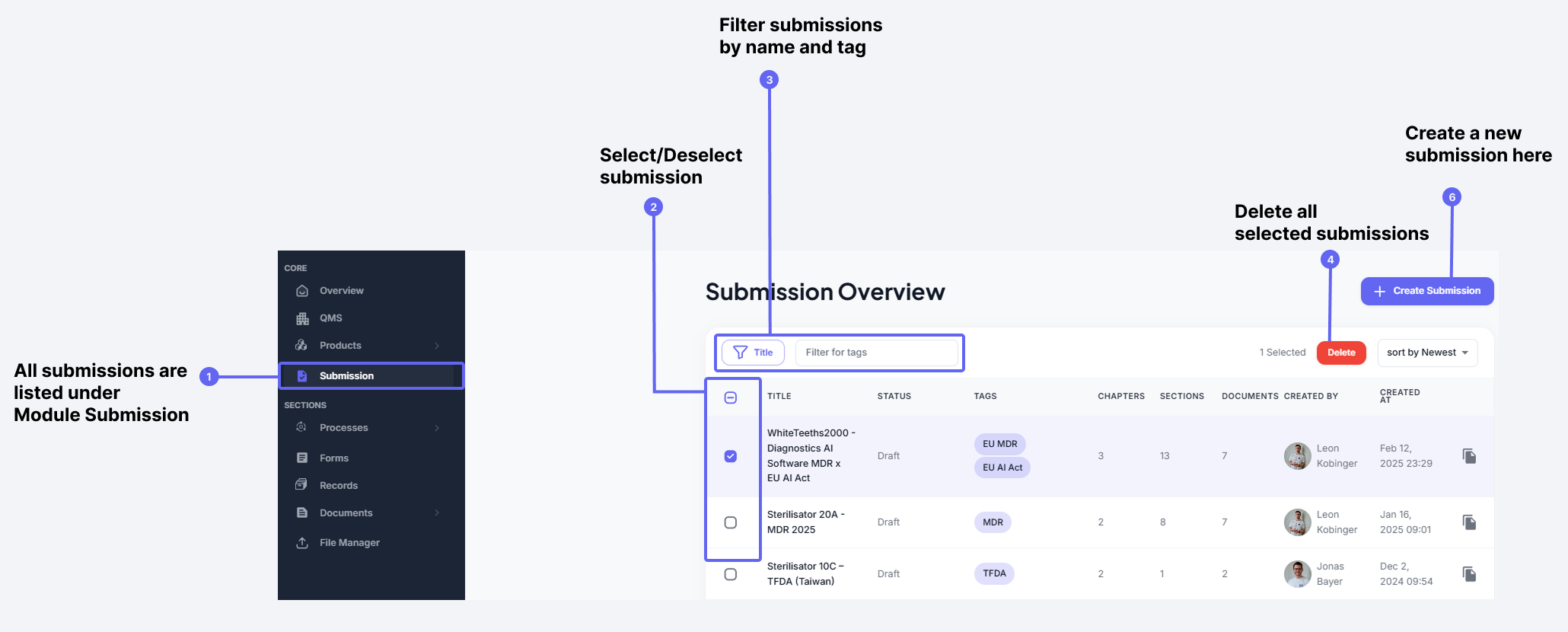
Everything is else regarding the Strcutre is completely analogous to the Submission!
Using Submission Templates
You can create Submissions by using the "Create Submission" buttons directly from Templates.

You will have to choose the product, for whihc this submission is created. In the background, all DOucments, that have been created for that Product will be used.
Example:
The Submission Template for MDR will obviously contain a Template for the Risk Management Report, as this is necessary for your submission.
If you have created a Risk Management Report for your Sterilizator 20A, and use the MDR Submission Template to create your Submission for the Sterilizator 20A, then your Risk Managemnt Report will be added to that Submission.
If no Risk Management Report is found by our System for the Sterilizator 20A, then the respective Document will be created and added.
The Document will then be found under your Document Management.