Schnellstart
CertHub ermöglicht es dir, eine XML-Datei herunterzuladen, mit der du dein Produkt in EUDAMED registrieren kannst. In der Regel erhältst du zwei XML-Dateien: eine zur Registrierung der Basic UDI und eine zur Registrierung aller UDI-DIs zu dieser Basic UDI.
Registrierungsprozess
XMLs herunterladen
Wenn du dein Produkt in EUDAMED registrieren möchtest, stelle sicher, dass du alle für EUDAMED benötigten Informationen in deinem Produkt in CertHub eingetragen hast. Prüfe außerdem, ob die regulatorischen Eigenschaften korrekt sind.
Gehe zu deinem Produkt und klicke auf "Download EUDAMED Registration". CertHub führt einige Validierungen für dich durch und informiert dich, wenn Informationen unvollständig oder aus einem anderen Grund ungültig sind.
Upload zu EUDAMED
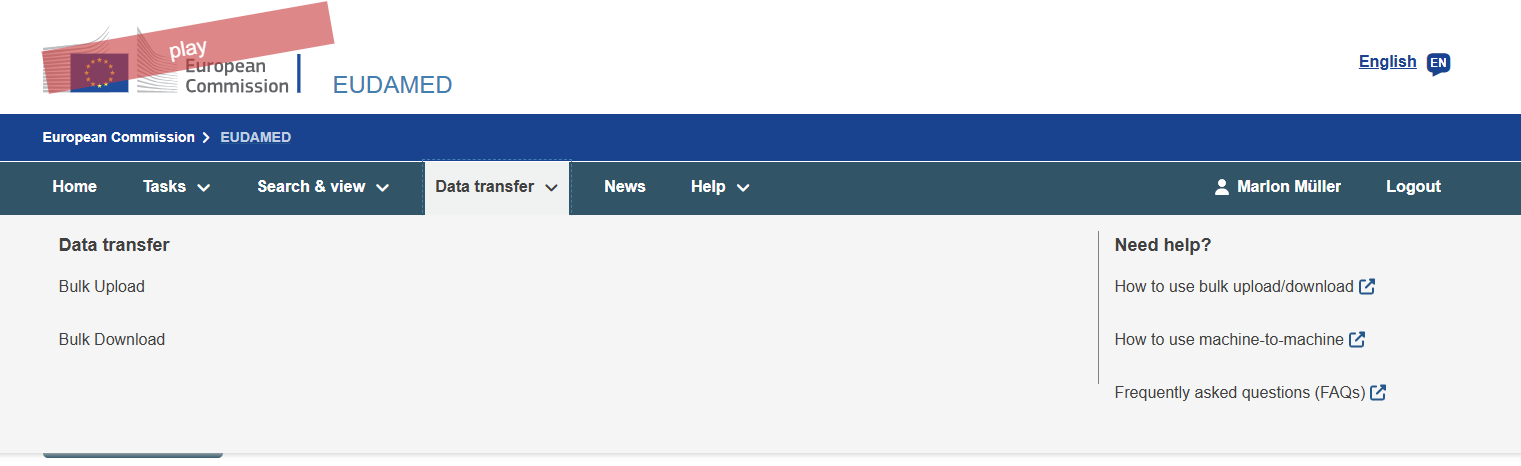
Gehe in EUDAMED zu Data Transfer -> Bulk Upload und klicke auf "New Upload".
Um deine Basic UDI zu registrieren, wähle den Service "Upload of Legacy / Regulation Device / SPP" und lade die Basic UDI Registration XML hoch.
Wenn dein Produkt mehr als eine Variante (UDI-DIs) hat, musst du diese in einem zweiten Schritt registrieren. Warte bitte, bis der erste Upload erfolgreich war, und klicke dann erneut auf "New Upload". Um die UDI-DIs zu registrieren, wähle den Service "Upload of UDI-DI / Master UDI-DI for existing Basic UDI" und lade die UDI-DI Registration XML hoch.
So trägst du die Informationen in CertHub ein
Um die XML zu erzeugen, muss CertHub wissen, wo es die für EUDAMED benötigten Informationen findet. Da die meisten dieser Informationen in den Knowledge Topics gespeichert sind, nutzt CertHub ein spezielles Attribut, um die relevanten Informationen in deiner Produktdatenbank zu finden. Wenn du die Templates verwendest, die unser Team für dich bereitgestellt hat, sind diese Attribute bereits korrekt gesetzt. Nur wenn du wesentliche Änderungen an unseren Templates vorgenommen oder eigene Schemes erstellt hast, musst du sie manuell setzen.
Das Referenz-Attribut setzen
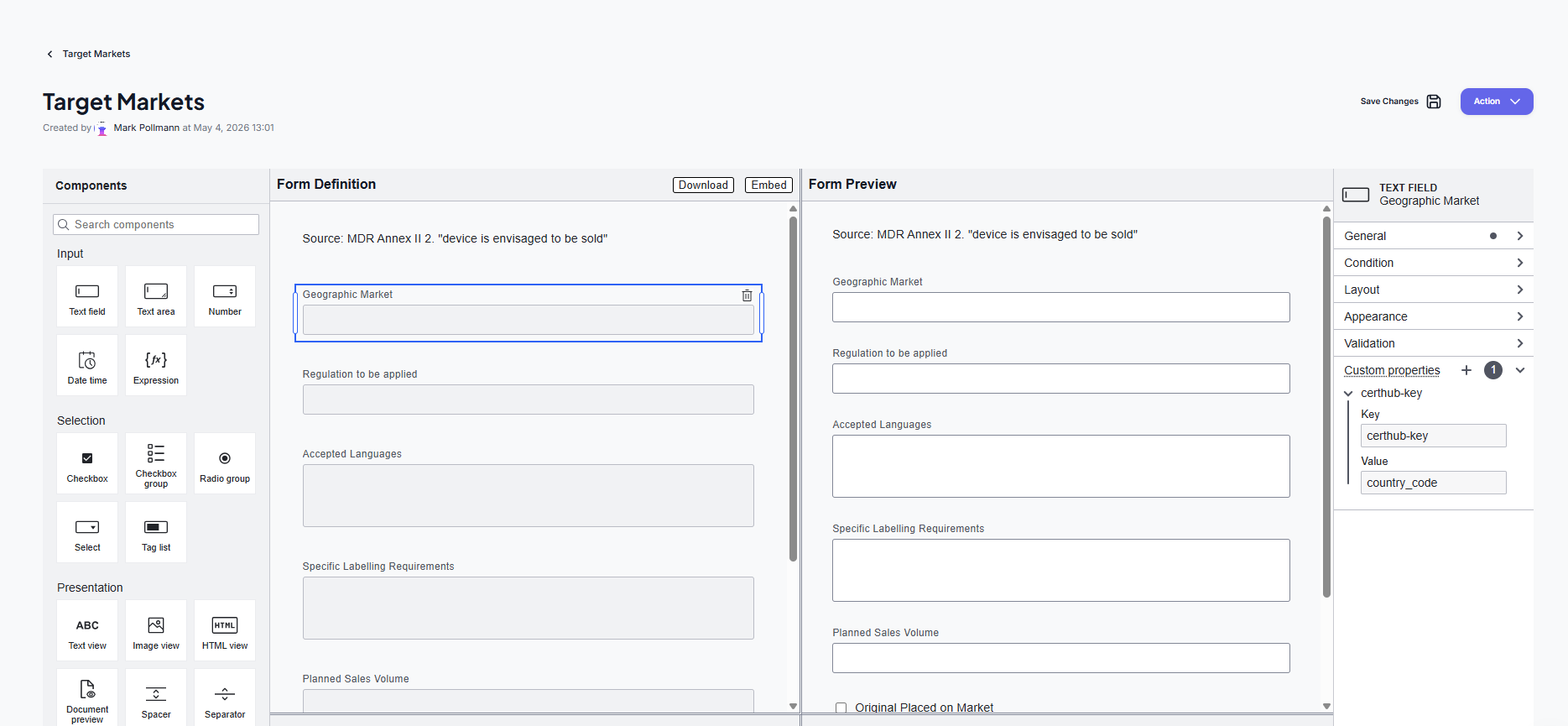
Um das Referenz-Attribut zu setzen, gehe in den KT-Editor und füge das Formularfeld hinzu bzw. wähle es aus, in dem die benötigte Information gespeichert wird. Gehe in der Sidebar zu "Custom Properties" und lege einen neuen Eintrag an. Trage als Key "certhub-key" ein und fülle den Wert mit der angegebenen Referenz. Eine vollständige Liste aller benötigten CertHub Keys findest du weiter unten.
Benötigte Referenzen
Hier sind alle Referenzen aufgeführt, die CertHub zur Erzeugung deiner XML verwendet. Achte darauf, dass du in deinen KT-Formularen den richtigen Feldtyp verwendest (Text, Date, Checkbox oder Number). Sofern nicht anders angegeben, erwartet das System die certhub-keys in dem KT, das in der folgenden Tabelle angegeben ist. Stelle sicher, dass der Name des KTs mit dem Namen in der Tabelle übereinstimmt. Wenn du die von CertHub bereitgestellten Templates verwendest, sind die certhub-keys in diesen KTs vorhanden.
| KT | Single / Multi | CertHub Key | Erwartetes Formularfeld | Anmerkungen |
|---|---|---|---|---|
| Global Element: Company Information | Global Element | information | Text | Setze dieses Feld in dem Eintrag, in dem du angibst, welche Information du in diesem Record speicherst (z.B. SRN, Company Name usw.). |
| Global Element: Company Information | Global Element | details | Text | |
| Target Markets | Multi | country_code | Text | Nur ein Country Code (z.B. DE, AT usw.) pro Record |
| Target Markets | Multi | original_placed_on_the_market | Checkbox | |
| Target Markets | Multi | start_date | Date | |
| Target Markets | Multi | end_date | Date | |
| UDI Management | Multi | udi_di | Text | Muss eine gültige UDI-DI sein |
| UDI Management | Multi | udi_di_issuer | Text/Select | Gültige Werte: GS1; IFA; HIBCC; ICCBBA |
| UDI Management | Multi | base_quantity | Number | |
| UDI Management | Multi | pielements | Text/Tag List | Gültige Werte: BATCH_NUMBER; SOFTWARE_IDENTIFICATION; EXPIRATION_DATE; MANUFACTURING_DATE. Wenn du mehrere UDI-PI-Elemente für eine einzelne UDI-DI verwendest, nutze eine Tag List |
| UDI Management | Multi | new_device | Checkbox | Nur für IVDR-Produkte |
| Variants/Configurations | Multi | emdn_codes | Text | Müssen gültige EMDN-Codes sein; wenn mehr als einer auf dein Produkt zutrifft, trenne sie durch Komma. Eine vollständige Liste gültiger EMDN-Codes findest du bei der Europäischen Kommission. |
| Variants/Configurations | Multi | infinite_reuses | Checkbox / Radio Group | Optional; muss entweder eine Checkbox oder eine Radio Group mit den gültigen Werten Yes, No sein. Bei Yes kann number_of_reuses leer bleiben und wird als -1 behandelt |
| Variants/Configurations | Multi | number_of_reuses | Number | Muss entweder 0 für Einmalprodukte, eine positive Zahl für wiederverwendbare Produkte mit begrenzter Anzahl an Wiederverwendungen oder -1 für unbegrenzte Wiederverwendungen sein |
| Variants/Configurations | Multi | sterile | Checkbox | |
| Variants/Configurations | Multi | sterilization | Checkbox | |
| Variants/Configurations | Multi | reference_number | Text | |
| Variants/Configurations | Multi | variant_description | Text | |
| Variants/Configurations | Multi | name | Text | |
| Variants/Configurations | Multi | latex | Checkbox | Nur für MDR-Produkte |
| Clinical Evaluations | Multi | clinical_investigation_reference | Text | Nur erforderlich bei Klasse IIb oder III |
| Clinical Evaluations | Multi | non_euapplicable_countries | Text | Nur erforderlich bei Klasse IIb oder III |
| Device Characteristics¹ | Single | animal_tissue_cells | Checkbox | |
| Device Characteristics¹ | Single | human_tissue_cells | Checkbox | |
| Device Characteristics¹ | Single | human_medicinal_product | Checkbox | |
| Device Characteristics¹ | Single | administering_medicine | Checkbox | |
| Device Characteristics¹ | Single | device_type | Text/Select | Gültige Werte: DEVICE; PROCEDURE_PACK; SYSTEM |
| Intended Use Statement¹ | Single | general_description | Text | |
| Device Characteristics¹ | Single | companion_diagnostics | Checkbox | Nur für IVDR |
| Device Characteristics¹ | Single | instrument | Checkbox | Nur für IVDR |
| Device Characteristics¹ | Single | kit | Checkbox | Nur für IVDR |
| Device Characteristics¹ | Single | microbial_substances | Checkbox | Nur für IVDR |
| Device Characteristics¹ | Single | design_type | Checkbox Group / Tag List | Nur für IVDR; Gültige Werte: Self-Testing, Near-Patient-Testing, Professional-Testing, General-Laboratory Use |
¹ Die Felder müssen sich nicht in einem bestimmten KT befinden. Die angegebenen KTs sind ein Vorschlag, wo du die Informationen speichern kannst. Wenn du die von CertHub bereitgestellten Templates verwendest, sind die certhub-keys in diesen KTs vorhanden.
Validierungsfehler beheben
CertHub führt vor dem Download der EUDAMED XML Validierungsprüfungen auf deinen Daten durch. Die folgende Tabelle listet alle möglichen Fehler und deren Behebung auf. Die Fehlermeldungen werden in CertHub immer auf Englisch angezeigt und sind hier deshalb im Original wiedergegeben.
| ID | Error Message (Originaltext aus CertHub) | Ursache | Behebung |
|---|---|---|---|
| 1 | The variant {Variant ID} does not contain a valid value for the latex field. | Die Checkbox mit dem certhub-key "latex" existiert entweder nicht im KT "Configuration/Variants" oder enthält keinen gültigen Wert. | Stelle sicher, dass die Checkbox mit dem certhub-key "latex" im KT "Variants/Configurations" existiert. Das Feld muss eine Checkbox sein, andere Eingabetypen sind nicht erlaubt. Wenn die Checkbox existiert und der Fehler weiterhin auftritt, öffne und speichere die Variante bitte erneut. |
| 2 | Certificate type is missing. Please add the certificate type in the corresponding entry of the "Issued Certificates" KT. | Der certhub-key "certificate_type" fehlt im KT "Issued Certificates" oder enthält einen leeren Wert. | Füge dem KT "Issued Certificates" den certhub-key "certificate_type" hinzu und trage einen gültigen Zertifikatstyp ein. |
| 3 | Invalid certificate type '{Certificate Type}' for {Regulation of your Product}. Please correct the certificate type entry. Valid values are: {Valid Values}. | Der Zertifikatstyp ist keiner der gültigen Werte für die angegebene Regulierung. | Korrigiere den Wert des Feldes mit dem certhub-key "certificate_type" im KT "Issued Certificates" auf einen der gültigen Werte. |
| 4 | Invalid or missing Notified Body actor code '{Invalid Code}' for certificate '{Certificate Number}'. The Notified Body actor code is mandatory and must be exactly 4 digits. | Der certhub-key "nb_identifier" im KT "Issued Certificates" fehlt entweder oder enthält keinen 4-stelligen Notified Body Actor Code. | Füge dem KT "Issued Certificates" den certhub-key "nb_identifier" hinzu und trage einen gültigen 4-stelligen Notified Body Actor Code ein. Die Actor Codes der Benannten Stellen findest du auf der Website der Europäischen Kommission für MDR und IVDR. |
| 5 | Products of risk class {Risk Class} must have at least one issued certificate for EUDAMED XML generation. Please add at least one entry to the 'Issued Certificates' multi-record KT. | Das Produkt benötigt ein von einer Benannten Stelle ausgestelltes Zertifikat, aber das KT "Issued Certificates" enthält keine Records. Ein Zertifikat ist erforderlich für MDR-Produkte der Klasse III, implantierbare MDR-Produkte der Klasse IIb, IVDR-Produkte der Klasse D sowie IVDR-Produkte der Klasse C, die für Self-Testing oder Near-Patient-Testing bestimmt sind. | Füge dem Multi-Record-KT "Issued Certificates" mindestens einen Record mit einem gültigen Zertifikat für das Produkt hinzu. Wenn du der Meinung bist, dass das Produkt kein Zertifikat benötigt, prüfe bitte die regulatorischen Eigenschaften: Bei MDR Klasse IIb entscheidet die Eigenschaft "Implantierbar" darüber, ob ein Zertifikat erforderlich ist, bei IVDR Klasse C der Design Type (Self-Testing / Near-Patient-Testing). |
| 6 | Products must have at least one variant or configuration for EUDAMED XML generation. | Das KT "Variants/Configurations" enthält keine Records. | Füge dem KT "Variants/Configurations" mindestens einen Record hinzu. Wenn du nur eine Variante hast, kannst du einen einzelnen Record mit den benötigten Informationen anlegen. Wenn das aktuelle Produkt die Variante ist und du die Produktfamilie nutzt, um allgemeine Informationen zur Basic UDI zu speichern, erzeuge die EUDAMED XML aus der Produktfamilie heraus. |
| 7 | Products must have at least one market entry for EUDAMED XML generation. | Das KT "Target Markets" enthält keine Records. | Füge dem KT "Target Markets" mindestens einen Record mit einem gültigen EU-Ländercode hinzu. |
| 8 | Products must have UDI-DI information for EUDAMED XML generation. | In den KTs "UDI Management" bzw. "Variants/Configurations" wurden keine UDI-DIs gefunden. | Stelle sicher, dass entweder das Multi-KT "UDI Management" existiert und mindestens einen Record enthält, oder dass das KT "Variants/Configurations" die certhub-keys "udi_di" und "udi_di_issuer" enthält. |
| 9 | Products must have a Basic UDI for EUDAMED XML generation. | Im Produkt wurde keine Basic UDI gefunden. | Trage die korrekte Basic UDI in den Metadaten deines Produkts ein. |
| 10 | Products must have an issuing entity for the UDI for EUDAMED XML generation. | Der Issuer der Basic UDI wurde in den Metadaten des Produkts nicht gefunden. | Trage den korrekten Issuer der Basic UDI in den Metadaten deines Produkts ein. |
| 11 | To upload the product to EUDAMED, please enter the manufacturer's SRN in the Company Information Global Element. | Die SRN des Herstellers wurde im Global Element "Company Information" nicht gefunden. | Trage die korrekte SRN des Herstellers im Global Element "Company Information" ein. Damit das System die SRN finden kann, muss das Global Element die certhub-keys "information" und "details" enthalten. In dem Record, der die SRN enthält, muss das Feld mit dem certhub-key "information" den Wert "SRN" enthalten und das Feld mit dem certhub-key "details" die SRN selbst. |
| 12 | The checkbox with the certhub-key 'animal_tissue_cells' is missing or contains an invalid value. | Die Checkbox mit dem certhub-key "animal_tissue_cells" existiert entweder nicht oder enthält keinen gültigen Wert. | Stelle sicher, dass die Checkbox mit dem certhub-key "animal_tissue_cells" existiert; wir empfehlen, das Feld im KT "Device Characteristics" anzulegen. Das Feld muss eine Checkbox sein, andere Eingabetypen sind nicht erlaubt. Wenn die Checkbox existiert und der Fehler weiterhin auftritt, öffne und speichere das KT bitte erneut. |
| 13 | The checkbox with the certhub-key 'human_tissue_cells' is missing or contains an invalid value. | Die Checkbox mit dem certhub-key "human_tissue_cells" existiert entweder nicht oder enthält keinen gültigen Wert. | Stelle sicher, dass die Checkbox mit dem certhub-key "human_tissue_cells" existiert; wir empfehlen, das Feld im KT "Device Characteristics" anzulegen. Das Feld muss eine Checkbox sein, andere Eingabetypen sind nicht erlaubt. Wenn die Checkbox existiert und der Fehler weiterhin auftritt, öffne und speichere das KT bitte erneut. |
| 14 | The product is marked as containing a medicinal product, but the checkbox with the certhub-key 'human_medicinal_product' is missing or contains an invalid value. | Die Checkbox mit dem certhub-key "human_medicinal_product" existiert nicht oder enthält keinen gültigen Wert, obwohl das Produkt laut den regulatorischen Eigenschaften ein Arzneimittel enthält. | Stelle sicher, dass die Checkbox mit dem certhub-key "human_medicinal_product" existiert; wir empfehlen, das Feld im KT "Device Characteristics" anzulegen. Das Feld muss eine Checkbox sein, andere Eingabetypen sind nicht erlaubt. Wenn die Checkbox existiert und der Fehler weiterhin auftritt, öffne und speichere das KT bitte erneut. |
| 15 | The checkbox with the certhub-key 'administering_medicine' is missing or contains an invalid value. | Die Checkbox mit dem certhub-key "administering_medicine" existiert entweder nicht oder enthält keinen gültigen Wert. | Stelle sicher, dass die Checkbox mit dem certhub-key "administering_medicine" existiert; wir empfehlen, das Feld im KT "Device Characteristics" anzulegen. Das Feld muss eine Checkbox sein, andere Eingabetypen sind nicht erlaubt. Wenn die Checkbox existiert und der Fehler weiterhin auftritt, öffne und speichere das KT bitte erneut. |
| 16 | The device type information is missing. Please add the certhub-key 'device_type' to the product's knowledge topics. Valid values are: {Valid Values}. | Der certhub-key "device_type" fehlt. | Füge den certhub-key "device_type" zu den Knowledge Topics des Produkts hinzu und trage einen gültigen Textwert ein; wir empfehlen, das Feld im KT "Device Characteristics" anzulegen. Gültige Werte sind: DEVICE; PROCEDURE_PACK; SYSTEM |
| 17 | The device type entry is not valid. Please correct the value in 'device_type'. Valid values are: {Valid Values} | Der certhub-key "device_type" ist vorhanden, enthält aber keinen gültigen Wert. | Korrigiere den Wert des Feldes mit dem certhub-key "device_type" auf einen der gültigen Werte. Gültige Werte sind: DEVICE; PROCEDURE_PACK; SYSTEM |
| 18 | The checkbox with the certhub-key 'companion_diagnostics' is missing or contains an invalid value. | Die Checkbox mit dem certhub-key "companion_diagnostics" existiert entweder nicht oder enthält keinen gültigen Wert. | Stelle sicher, dass die Checkbox mit dem certhub-key "companion_diagnostics" existiert; wir empfehlen, das Feld im KT "Device Characteristics" anzulegen. Das Feld muss eine Checkbox sein, andere Eingabetypen sind nicht erlaubt. Wenn die Checkbox existiert und der Fehler weiterhin auftritt, öffne und speichere das KT bitte erneut. |
| 19 | The checkbox with the certhub-key 'instrument' is missing or contains an invalid value. | Die Checkbox mit dem certhub-key "instrument" existiert entweder nicht oder enthält keinen gültigen Wert. | Stelle sicher, dass die Checkbox mit dem certhub-key "instrument" existiert; wir empfehlen, das Feld im KT "Device Characteristics" anzulegen. Das Feld muss eine Checkbox sein, andere Eingabetypen sind nicht erlaubt. Wenn die Checkbox existiert und der Fehler weiterhin auftritt, öffne und speichere das KT bitte erneut. |
| 20 | The checkbox with the certhub-key 'kit' is missing or contains an invalid value. | Die Checkbox mit dem certhub-key "kit" existiert entweder nicht oder enthält keinen gültigen Wert. | Stelle sicher, dass die Checkbox mit dem certhub-key "kit" existiert; wir empfehlen, das Feld im KT "Device Characteristics" anzulegen. Das Feld muss eine Checkbox sein, andere Eingabetypen sind nicht erlaubt. Wenn die Checkbox existiert und der Fehler weiterhin auftritt, öffne und speichere das KT bitte erneut. |
| 21 | The checkbox with the certhub-key 'microbial_substances' is missing or contains an invalid value. | Die Checkbox mit dem certhub-key "microbial_substances" existiert entweder nicht oder enthält keinen gültigen Wert. | Stelle sicher, dass die Checkbox mit dem certhub-key "microbial_substances" existiert; wir empfehlen, das Feld im KT "Device Characteristics" anzulegen. Das Feld muss eine Checkbox sein, andere Eingabetypen sind nicht erlaubt. Wenn die Checkbox existiert und der Fehler weiterhin auftritt, öffne und speichere das KT bitte erneut. |
| 22 | The design type information is missing. Please add the certhub-key 'design_type' to the product's knowledge units. Valid Values are: "Self-Testing", "Near-Patient-Testing", "Professional-Testing" | Der certhub-key "design_type" fehlt. | Füge den certhub-key "design_type" zu den Knowledge Units des Produkts hinzu und trage einen gültigen Textwert ein; wir empfehlen, das Feld im KT "Device Characteristics" anzulegen. Gültige Werte sind: Self-Testing, Near-Patient-Testing, Professional-Testing. Wenn mehr als einer dieser Werte auf dein Produkt zutrifft, verwende im KT eine Checkbox Group oder ein Tag-Auswahlfeld. |
| 23 | If a product family contains variants, each variant must have market information and UDI-DI information linked via the Tracer. | Die Produktfamilie enthält Varianten, aber bei mindestens einer Variante sind keine Marktinformationen oder UDI-DI-Informationen über den Tracer verknüpft. | Stelle sicher, dass die KTs "Target Markets" und "UDI Management" existieren, beide Records enthalten und dass diese Records mit den zugehörigen Varianten aus dem KT "Variants/Configurations" verknüpft sind. |
| 24 | If a product in the family does not contain variants, enter the UDI-DI in the product metadata. Please make sure the 'UDI Management' multi-record KT does not contain any UDI-DI entries for {Product Name}. | Das Produkt gehört zu einer Produktfamilie und enthält keine Varianten im KT "Variants/Configurations", aber das KT "UDI Management" enthält UDI-DI-Einträge für das Produkt. | Ein leeres KT "Variants/Configurations" in einem Produkt, das zu einer Produktfamilie gehört, bedeutet, dass die Produktfamilie die Basic UDI trägt und das Produkt die UDI-DI. Stelle sicher, dass das KT "UDI Management" keine UDI-DI-Einträge für das Produkt enthält. Wenn das Produkt keine Varianten enthält, trage die UDI-DI stattdessen in den Metadaten des Produkts ein. |
| 25 | Each variant of a Basic UDI must have an UDI-DI. | Das Produkt gehört zu einer Produktfamilie und enthält keine Varianten im KT "Variants/Configurations", aber in den Metadaten des Produkts fehlt die UDI-DI. | Ein leeres KT "Variants/Configurations" in einem Produkt, das zu einer Produktfamilie gehört, bedeutet, dass die Produktfamilie die Basic UDI trägt und das Produkt die UDI-DI. Stelle sicher, dass die UDI-DI in den Metadaten des Produkts eingetragen ist. |
| 26 | All variants of a Basic UDI must have an UDI-DI issuer. | Das Produkt gehört zu einer Produktfamilie und enthält keine Varianten im KT "Variants/Configurations", aber in den Metadaten des Produkts fehlt der UDI-DI-Issuer. | Ein leeres KT "Variants/Configurations" in einem Produkt, das zu einer Produktfamilie gehört, bedeutet, dass die Produktfamilie die Basic UDI trägt und das Produkt die UDI-DI. Stelle sicher, dass der UDI-DI-Issuer in den Metadaten des Produkts eingetragen ist. |
| 27 | The product {Product Name} does not contain any EMDN codes. Please add the certhub-key 'emdn_codes' to the product or the product family and enter at least one valid EMDN code. | Das Produkt gehört zu einer Produktfamilie und enthält keine Varianten, das Produkt selbst trägt also die UDI-DI. In den KTs des Produkts oder der Produktfamilie wurde kein Feld mit dem certhub-key "emdn_codes" gefunden. | Füge einem KT des Produkts oder der Produktfamilie ein Feld mit dem certhub-key "emdn_codes" hinzu und trage mindestens einen gültigen EMDN-Code ein. Wenn mehr als ein EMDN-Code zutrifft, trenne sie durch Komma oder verwende eine Tag List. Eine vollständige Liste gültiger EMDN-Codes findest du bei der Europäischen Kommission. |
| 28 | The product {Product Name} is marked as reusable, but does not contain a valid number of reuses. Please enter a single positive whole number in the field with the certhub-key 'number_of_reuses'. | Die regulatorischen Eigenschaften kennzeichnen das Produkt als wiederverwendbar, aber das Feld mit dem certhub-key "number_of_reuses" fehlt, existiert mehrfach in den KTs des Produkts und der Produktfamilie oder enthält keine positive ganze Zahl. | Füge einem KT des Produkts oder der Produktfamilie genau ein Number-Feld mit dem certhub-key "number_of_reuses" hinzu und trage die maximale Anzahl an Wiederverwendungen ein. Beachte, dass der Wert in diesem Fall größer als 0 sein muss: Der Schalter "infinite_reuses" und der Wert -1 werden nur für Varianten im KT "Variants/Configurations" unterstützt. Wenn das Produkt nicht wiederverwendbar ist, korrigiere stattdessen die regulatorische Eigenschaft "Wiederverwendbarkeit". |
| 29 | The product {Product Name} does not contain a valid value for the sterile field. Please add a single checkbox with the certhub-key 'sterile' to the product or the product family. | Die Checkbox mit dem certhub-key "sterile" fehlt, existiert mehrfach in den KTs des Produkts und der Produktfamilie oder enthält keinen gültigen Wert. | Stelle sicher, dass in den KTs des Produkts oder der Produktfamilie genau eine Checkbox mit dem certhub-key "sterile" existiert. Das Feld muss eine Checkbox sein, andere Eingabetypen sind nicht erlaubt. Wenn die Checkbox existiert und der Fehler weiterhin auftritt, öffne und speichere das KT bitte erneut. |
| 30 | The product {Product Name} is marked as sterile, but does not contain a valid value for the sterilization field. Please add a single checkbox with the certhub-key 'sterilization' to the product or the product family. | Das Produkt ist als steril gekennzeichnet, aber die Checkbox mit dem certhub-key "sterilization" fehlt, existiert mehrfach in den KTs des Produkts und der Produktfamilie oder enthält keinen gültigen Wert. | Stelle sicher, dass in den KTs des Produkts oder der Produktfamilie genau eine Checkbox mit dem certhub-key "sterilization" existiert. Das Feld muss eine Checkbox sein, andere Eingabetypen sind nicht erlaubt. Wenn das Produkt nicht steril ist, korrigiere stattdessen den Wert der Checkbox "sterile". |
| 31 | The base quantity of the product {Product Name} is not valid. The field with the certhub-key 'base_quantity' must contain a single positive whole number. | Das Feld mit dem certhub-key "base_quantity" enthält einen Wert, der keine positive ganze Zahl ist, oder es existiert mehrfach in den KTs des Produkts und der Produktfamilie. | Die Base Quantity ist optional: Entferne entweder den Wert, oder stelle sicher, dass genau ein Number-Feld mit dem certhub-key "base_quantity" existiert und eine positive ganze Zahl enthält. |
| 32 | The product {Product Name} does not contain any UDI-PI elements. Please add the certhub-key 'pielements' to the product or the product family and enter at least one valid UDI-PI element. | In den KTs des Produkts oder der Produktfamilie wurde kein Feld mit dem certhub-key "pielements" gefunden, oder das Feld ist leer. | Füge einem KT des Produkts oder der Produktfamilie ein Feld mit dem certhub-key "pielements" hinzu. Gültige Werte sind: BATCH_NUMBER; SOFTWARE_IDENTIFICATION; EXPIRATION_DATE; MANUFACTURING_DATE. Wenn du mehr als ein UDI-PI-Element verwendest, nutze eine Tag List. |
| 33 | The product {Product Name} contains invalid UDI-PI elements. Please correct the value in 'pielements'. Valid values are: {Valid Values} | Das Feld mit dem certhub-key "pielements" enthält mindestens einen Wert, der kein gültiges UDI-PI-Element ist. | Korrigiere die Werte des Feldes mit dem certhub-key "pielements". Gültige Werte sind: BATCH_NUMBER; SOFTWARE_IDENTIFICATION; EXPIRATION_DATE; MANUFACTURING_DATE. |
| 34 | The product {Product Name} does not contain a valid value for the latex field. Please add a single checkbox with the certhub-key 'latex' to the product or the product family. | Nur für MDR-Produkte: Die Checkbox mit dem certhub-key "latex" fehlt, existiert mehrfach in den KTs des Produkts und der Produktfamilie oder enthält keinen gültigen Wert. | Stelle sicher, dass in den KTs des Produkts oder der Produktfamilie genau eine Checkbox mit dem certhub-key "latex" existiert. Das Feld muss eine Checkbox sein, andere Eingabetypen sind nicht erlaubt. Wenn die Checkbox existiert und der Fehler weiterhin auftritt, öffne und speichere das KT bitte erneut. |
| 35 | Product families must have at least one product for EUDAMED XML generation. | Die EUDAMED XML wurde aus einer Produktfamilie erzeugt, die keine Produkte enthält. | Füge der Produktfamilie mindestens ein Produkt hinzu. Wenn die Basic UDI vom Produkt selbst getragen wird, erzeuge die EUDAMED XML aus dem Produkt statt aus der Produktfamilie. |
| 36 | At least one product in the product family must have valid UDI-DI information for EUDAMED XML generation. | Keines der Produkte in der Produktfamilie hat die für die XML benötigten UDI-DI-Informationen geliefert. | Dieser Fehler wird immer zusammen mit den Fehlern der einzelnen Produkte angezeigt. Behebe zuerst diese Fehler, dann verschwindet auch dieser Fehler. |
| 37 | The checkbox with the certhub-key 'near_patient_testing' is missing or contains an invalid value. | Nur für IVDR-Produktfamilien: Die Checkbox mit dem certhub-key "near_patient_testing" existiert entweder nicht oder enthält keinen gültigen Wert. | Stelle sicher, dass die Checkbox mit dem certhub-key "near_patient_testing" in einem KT der Produktfamilie existiert; wir empfehlen, das Feld im KT "Device Characteristics" anzulegen. Das Feld muss eine Checkbox sein, andere Eingabetypen sind nicht erlaubt. Beachte, dass ein einzelnes IVDR-Produkt stattdessen den certhub-key "design_type" verwendet (siehe ID 22). |
| 38 | The checkbox with the certhub-key 'professional_testing' is missing or contains an invalid value. | Nur für IVDR-Produktfamilien: Die Checkbox mit dem certhub-key "professional_testing" existiert entweder nicht oder enthält keinen gültigen Wert. | Stelle sicher, dass die Checkbox mit dem certhub-key "professional_testing" in einem KT der Produktfamilie existiert; wir empfehlen, das Feld im KT "Device Characteristics" anzulegen. Das Feld muss eine Checkbox sein, andere Eingabetypen sind nicht erlaubt. Beachte, dass ein einzelnes IVDR-Produkt stattdessen den certhub-key "design_type" verwendet (siehe ID 22). |
| 39 | The checkbox with the certhub-key 'self_testing' is missing or contains an invalid value. | Nur für IVDR-Produktfamilien: Die Checkbox mit dem certhub-key "self_testing" existiert entweder nicht oder enthält keinen gültigen Wert. | Stelle sicher, dass die Checkbox mit dem certhub-key "self_testing" in einem KT der Produktfamilie existiert; wir empfehlen, das Feld im KT "Device Characteristics" anzulegen. Das Feld muss eine Checkbox sein, andere Eingabetypen sind nicht erlaubt. Beachte, dass ein einzelnes IVDR-Produkt stattdessen den certhub-key "design_type" verwendet (siehe ID 22). |
| 40 | Product families must have a Basic UDI for EUDAMED XML generation. | Die EUDAMED XML wurde aus einer Produktfamilie erzeugt, aber in den Metadaten der Produktfamilie wurde keine Basic UDI gefunden. | Trage die korrekte Basic UDI in den Metadaten deiner Produktfamilie ein. Wenn die Basic UDI vom Produkt statt von der Produktfamilie getragen wird, erzeuge die EUDAMED XML aus dem Produkt. |
| 41 | Product families must have an issuing entity for the Basic UDI for EUDAMED XML generation. | Die EUDAMED XML wurde aus einer Produktfamilie erzeugt, aber der Issuer der Basic UDI wurde in den Metadaten der Produktfamilie nicht gefunden. | Trage den korrekten Issuer der Basic UDI in den Metadaten deiner Produktfamilie ein. |
| 42 | The device is marked as single-use in the regulatory properties, but the field with the certhub-key 'number_of_reuses' contains a number greater than 0. Please correct this contradiction. | Die regulatorische Eigenschaft "Wiederverwendbarkeit" ist auf Single Use gesetzt, aber es wurde eine Anzahl an Wiederverwendungen größer als 0 eingetragen. EUDAMED akzeptiert eine maximale Anzahl an Wiederverwendungen nur für Produkte, die nicht für den einmaligen Gebrauch bestimmt sind. | Korrigiere entweder die regulatorische Eigenschaft "Wiederverwendbarkeit" des Produkts, oder entferne den Wert aus dem Feld mit dem certhub-key "number_of_reuses" (bzw. setze ihn auf 0). |
| 43 | No Global Elements were found for your tenant. Please create a 'Company Information' Global Element and store the manufacturer SRN in it. | In deiner CertHub-Instanz existiert überhaupt kein Global Element, daher kann die Hersteller-SRN nicht ausgelesen werden. Dieser Fehler tritt immer zusammen mit ID 11 auf. | Lege ein Global Element mit dem Namen "Company Information" an und füge ihm Felder mit den certhub-keys "information" und "details" hinzu. Lege dann einen Record an, der im Feld "information" den Wert "SRN" und im Feld "details" deine SRN enthält. |
| 44 | No Global Element named 'Company Information' with a form was found. Please create a Global Element with exactly this name and add the fields needed to store the manufacturer SRN. | Es existieren Global Elements, aber keines davon heißt exakt "Company Information", oder das entsprechende Global Element hat noch kein Formular. Dieser Fehler tritt immer zusammen mit ID 11 auf. | Lege ein Global Element an oder benenne eines so um, dass es exakt "Company Information" heißt, und stelle sicher, dass es ein Formular mit den Feldern mit den certhub-keys "information" und "details" enthält. |
| 45 | The 'Company Information' Global Element does not contain the certhub-keys 'information' and 'details'. Please add both fields so the manufacturer SRN can be read. | Das Global Element "Company Information" existiert, aber sein Formular enthält kein Feld mit dem certhub-key "information" und/oder kein Feld mit dem certhub-key "details". Dieser Fehler tritt immer zusammen mit ID 11 auf. | Füge beide Felder zum Formular des Global Elements "Company Information" hinzu. Das Feld mit dem certhub-key "information" gibt an, welche Information ein Record enthält, das Feld mit dem certhub-key "details" enthält den Wert selbst. |
| 46 | The 'Company Information' Global Element does not contain any records. Please add a record with the value 'SRN' in the field with the certhub-key 'information' and the manufacturer SRN in the field with the certhub-key 'details'. | Das Global Element "Company Information" ist korrekt eingerichtet, aber es wurden noch keine Records eingetragen. Dieser Fehler tritt immer zusammen mit ID 11 auf. | Füge dem Global Element "Company Information" einen Record hinzu, in dem das Feld mit dem certhub-key "information" den Wert "SRN" enthält und das Feld mit dem certhub-key "details" deine SRN. |
| 47 | The 'Company Information' Global Element does not contain a record whose field with the certhub-key 'information' has the value 'SRN'. Please add such a record and enter the manufacturer SRN in the field with the certhub-key 'details'. | Das Global Element "Company Information" enthält Records, aber keiner davon ist als SRN-Record gekennzeichnet. Dieser Fehler tritt immer zusammen mit ID 11 auf. | Füge einen Record hinzu, in dem das Feld mit dem certhub-key "information" exakt den Wert "SRN" enthält, und trage deine SRN im Feld mit dem certhub-key "details" ein. Beachte, dass bei dem Wert Groß- und Kleinschreibung unterschieden wird. |
| 48 | The SRN record of the 'Company Information' Global Element is empty. Please enter the manufacturer SRN in the field with the certhub-key 'details'. | Der mit "SRN" gekennzeichnete Record existiert, aber sein Feld mit dem certhub-key "details" ist leer. Dieser Fehler tritt immer zusammen mit ID 11 auf. | Trage deine Hersteller-SRN im Feld mit dem certhub-key "details" des SRN-Records ein. |
| 49 | The UDI-DI entry does not have any trace links. Each UDI-DI entry must be trace-linked to the variant entry it belongs to. | Das Produkt speichert seine UDI-DIs in einem separaten KT "UDI Management", aber der UDI-DI-Record ist über den Tracer mit keinem anderen Record verbunden. CertHub kann daher nicht erkennen, zu welcher Variante er gehört. Dieser Fehler tritt immer zusammen mit ID 64 auf. | Öffne den Tracer und erstelle eine Trace-Verbindung zwischen dem UDI-DI-Eintrag im KT "UDI Management" und dem zugehörigen Eintrag im KT "Variants/Configurations". |
| 50 | The UDI-DI entry is trace-linked to more than one variant entry. Each UDI-DI entry may only be linked to exactly one variant entry. | Der UDI-DI-Record im KT "UDI Management" ist über den Tracer mit mehreren Records des KTs "Variants/Configurations" verbunden. Eine UDI-DI gehört immer zu genau einer Variante. Dieser Fehler tritt immer zusammen mit ID 64 auf. | Öffne den Tracer und entferne die Trace-Verbindungen zu allen Varianten, zu denen die UDI-DI nicht gehört, sodass genau eine Verbindung übrig bleibt. |
| 51 | The market {Country Code} has more than one metadata entry linked to it. Each combination of a market and a variant may only have one entry of the 'Target Markets Metadata' KT trace-linked to it. | Ein Eintrag des KTs "Target Markets Metadata" enthält das Startdatum, das Enddatum und das Kennzeichen für den Erstmarkt für einen Markt einer Variante. CertHub verwendet daher den Metadaten-Eintrag, der gleichzeitig mit dem Markt-Eintrag und mit dem Varianten-Eintrag verknüpft ist. Hier ist mehr als ein Metadaten-Eintrag mit beiden verknüpft, sodass CertHub nicht erkennen kann, welche Daten verwendet werden sollen. | Öffne den Tracer und sieh dir den in der Fehlermeldung genannten Markt an. Pro Variante darf es nur einen Metadaten-Eintrag geben, der gleichzeitig mit diesem Markt und dieser Variante verknüpft ist. Entferne die Trace-Verbindungen der überzähligen Einträge oder lösche diese Einträge. Beispiel: Wenn du Variante A und Variante B in Deutschland vertreibst, brauchst du zwei Metadaten-Einträge: einen, der mit Deutschland und Variante A verknüpft ist, und einen, der mit Deutschland und Variante B verknüpft ist. Zwei Einträge, die beide mit Deutschland und Variante A verknüpft sind, verursachen diesen Fehler. |
| 52 | The UDI-DI must be available in at least one EU market. Please add at least one entry with a valid EU country code to the 'Target Markets' KT. | Für diese UDI-DI wurde kein Markt mit einem gültigen EU-Ländercode gefunden. Märkte außerhalb der EU werden für EUDAMED ignoriert, und bei Produkten mit Varianten werden nur die Märkte berücksichtigt, die mit der Variante über den Tracer verknüpft sind. | Füge dem KT "Target Markets" einen Eintrag mit einem gültigen EU-Ländercode hinzu (z.B. DE, AT, FR) und verknüpfe ihn, falls das Produkt Varianten hat, über den Tracer mit der entsprechenden Variante. Produkte der Risikoklasse I und der Klasse A benötigen keinen Markteintrag. |
| 53 | Exactly one market entry must be marked as the market where the device was first placed on the market. Please make sure that the checkbox with the certhub-key 'original_placed_on_the_market' is set in exactly one of the linked 'Target Markets' entries. | Bei keinem oder bei mehr als einem der Markteinträge ist die Checkbox mit dem certhub-key "original_placed_on_the_market" gesetzt. EUDAMED erwartet genau einen Erstmarkt pro UDI-DI. | Setze die Checkbox mit dem certhub-key "original_placed_on_the_market" in genau einem "Target Markets"-Eintrag (bzw. in dessen "Target Markets Metadata"-Eintrag) und entferne sie bei allen anderen. |
| 54 | MDR devices must have a valid risk class according to MDR (I, IIa, IIb, III). Please correct the risk class in the regulatory properties of the device. | Das Produkt ist unter MDR registriert, aber seine Risikoklasse ist keine der MDR-Klassen I, IIa, IIb oder III, zum Beispiel weil eine IVDR-Klasse (A bis D) ausgewählt wurde. | Öffne die regulatorischen Eigenschaften des Produkts und wähle eine für MDR gültige Risikoklasse: I, IIa, IIb oder III. Wenn es sich um ein In-vitro-Diagnostikum handelt, ändere stattdessen die Regulierung auf IVDR. |
| 55 | The regulatory property 'active' is not filled in. Please set it to yes or no in the regulatory properties of the device. | Nur für MDR-Produkte: Die regulatorische Eigenschaft "Aktives Medizinprodukt" ist leer, EUDAMED benötigt aber einen Ja- oder Nein-Wert. | Öffne die regulatorischen Eigenschaften des Produkts und setze "Aktives Medizinprodukt" auf Ja oder Nein. |
| 56 | The regulatory property 'measurement' is not filled in. Please set it to yes or no in the regulatory properties of the device. | Nur für MDR-Produkte: Die regulatorische Eigenschaft "Messfunktion" ist leer, EUDAMED benötigt aber einen Ja- oder Nein-Wert. | Öffne die regulatorischen Eigenschaften des Produkts und setze "Messfunktion" auf Ja oder Nein. |
| 57 | The regulatory property 'reusable' is not filled in. Please select in the regulatory properties of the device whether it is a single-use device, a reusable surgical instrument or otherwise reusable. | Nur für MDR-Produkte: Die regulatorische Eigenschaft "Wiederverwendbarkeit" ist leer. CertHub benötigt sie, um zu entscheiden, ob eine maximale Anzahl an Wiederverwendungen an EUDAMED gemeldet werden muss. | Öffne die regulatorischen Eigenschaften des Produkts und wähle einen der Werte "Single Use", "Surgical Reusable Instrument" oder "Other". |
| 58 | The regulatory property 'sterile' is not filled in. Please set it to yes or no in the regulatory properties of the device. | Nur für MDR-Produkte: Die regulatorische Eigenschaft "Steril" ist leer, EUDAMED benötigt aber einen Ja- oder Nein-Wert. | Öffne die regulatorischen Eigenschaften des Produkts und setze "Steril" auf Ja oder Nein. |
| 59 | The regulatory property 'implantable' is not filled in. Please set it to yes or no in the regulatory properties of the device. | Nur für MDR-Produkte: Die regulatorische Eigenschaft "Implantierbar" ist leer, EUDAMED benötigt aber einen Ja- oder Nein-Wert. Sie entscheidet außerdem darüber, ob ein Produkt der Klasse IIb ein Zertifikat benötigt (siehe ID 5). | Öffne die regulatorischen Eigenschaften des Produkts und setze "Implantierbar" auf Ja oder Nein. |
| 60 | The regulatory property 'medicinal product' is not filled in. Please set it to yes or no in the regulatory properties of the device. | Nur für MDR-Produkte: Die regulatorische Eigenschaft "Arzneimittel" ist leer, EUDAMED benötigt aber einen Ja- oder Nein-Wert. Wenn sie auf Ja gesetzt ist, wird zusätzlich die Checkbox mit dem certhub-key "human_medicinal_product" benötigt (siehe ID 14). | Öffne die regulatorischen Eigenschaften des Produkts und setze "Arzneimittel" auf Ja oder Nein. |
| 61 | The regulatory property 'reprocessing' is not filled in. Please set it to yes or no in the regulatory properties of the device. | Nur für MDR-Produkte: Die regulatorische Eigenschaft "Aufbereitung" ist leer, EUDAMED benötigt aber einen Ja- oder Nein-Wert. | Öffne die regulatorischen Eigenschaften des Produkts und setze "Aufbereitung" auf Ja oder Nein. |
| 62 | IVDR devices must have a valid risk class according to IVDR (A, B, C, D). Please correct the risk class in the regulatory properties of the device. | Das Produkt ist unter IVDR registriert, aber seine Risikoklasse ist keine der IVDR-Klassen A, B, C oder D, zum Beispiel weil eine MDR-Klasse (I bis III) ausgewählt wurde. | Öffne die regulatorischen Eigenschaften des Produkts und wähle eine für IVDR gültige Risikoklasse: A, B, C oder D. Wenn es sich nicht um ein In-vitro-Diagnostikum handelt, ändere stattdessen die Regulierung auf MDR. |
| 63 | The regulatory property 'reagents' is not filled in. Please set it to yes or no in the regulatory properties of the device. | Nur für IVDR-Produkte: Die regulatorische Eigenschaft "Reagenzien" ist leer, EUDAMED benötigt aber einen Ja- oder Nein-Wert. | Öffne die regulatorischen Eigenschaften des Produkts und setze "Reagenzien" auf Ja oder Nein. |
| 64 | The UDI-DI entry is not linked to a variant entry. Please create or correct the tracer link so the UDI-DI points to exactly one Variant entry in Variants/Configurations. | CertHub konnte nicht ermitteln, zu welcher Variante ein UDI-DI-Eintrag gehört. Entweder hat der UDI-DI-Eintrag überhaupt keine Trace-Verbindungen (siehe ID 49), er ist mit mehr als einer Variante verknüpft (siehe ID 50), oder seine Trace-Verbindungen zeigen auf Records, die keine Varianten-Einträge sind. | Öffne den Tracer und stelle sicher, dass der UDI-DI-Eintrag des KTs "UDI Management" mit genau einem Eintrag des KTs "Variants/Configurations" verknüpft ist. |
| 65 | The variant entry {Variant Name} has not been saved completely. Please open the variant entry and save it again so EUDAMED XML can be generated. | Der Varianten-Record hat noch keine interne ID, das heißt, er wurde nie erfolgreich gespeichert. | Öffne das KT "Variants/Configurations", öffne den Varianten-Eintrag und speichere ihn erneut. Wenn der Fehler weiterhin auftritt, wende dich bitte an den Support. |
| 66 | The UDI-DI of the variant {Variant Name} is missing. Please enter it in the field with the certhub-key 'udi_di'. | Das Feld mit dem certhub-key "udi_di" ist leer oder enthält "N/A". Je nach Setup liegt dieses Feld entweder im KT "UDI Management" oder direkt im KT "Variants/Configurations". | Trage im Feld mit dem certhub-key "udi_di" des UDI-DI-Eintrags, der zu dieser Variante gehört, eine gültige UDI-DI ein. |
| 67 | The UDI-DI issuer of the variant {Variant Name} is missing. Please enter it in the field with the certhub-key 'udi_di_issuer'. | Das Feld mit dem certhub-key "udi_di_issuer" ist leer oder enthält "N/A". | Trage die ausstellende Stelle der UDI-DI im Feld mit dem certhub-key "udi_di_issuer" ein. Gültige Werte sind: GS1; IFA; HIBCC; ICCBBA. |
| 68 | The variant {Variant Name} does not contain any EMDN codes. Please enter at least one valid EMDN code in the field with the certhub-key 'emdn_codes'. | Das Feld mit dem certhub-key "emdn_codes" des Varianten-Eintrags ist leer oder existiert nicht. | Trage im Feld mit dem certhub-key "emdn_codes" des KTs "Variants/Configurations" mindestens einen gültigen EMDN-Code ein. Wenn mehr als ein Code zutrifft, trenne sie durch Komma oder verwende eine Tag List. Eine vollständige Liste gültiger EMDN-Codes findest du bei der Europäischen Kommission. |
| 69 | The variant {Variant Name} is marked as reusable, but does not contain a valid number of reuses. Please enter a number greater than 0 in the field with the certhub-key 'number_of_reuses', or -1 for an unlimited number of reuses. | Die regulatorische Eigenschaft "Wiederverwendbarkeit" kennzeichnet das Produkt als wiederverwendbar, aber das Feld mit dem certhub-key "number_of_reuses" der Variante ist leer oder enthält keine gültige Zahl. | Trage die maximale Anzahl an Wiederverwendungen im Feld mit dem certhub-key "number_of_reuses" der Variante ein. Trage -1 ein, wenn die Anzahl der Wiederverwendungen unbegrenzt ist, oder aktiviere stattdessen das optionale Feld mit dem certhub-key "infinite_reuses". Wenn das Produkt nicht wiederverwendbar ist, korrigiere die regulatorische Eigenschaft "Wiederverwendbarkeit" (siehe ID 57). |
| 70 | The variant {Variant Name} does not contain a valid value for the sterile field. Please fill in the checkbox with the certhub-key 'sterile' in the 'Variants/Configurations' KT. | Die Checkbox mit dem certhub-key "sterile" existiert entweder nicht im KT "Variants/Configurations" oder enthält keinen gültigen Wert. | Stelle sicher, dass die Checkbox mit dem certhub-key "sterile" im KT "Variants/Configurations" existiert. Das Feld muss eine Checkbox sein, andere Eingabetypen sind nicht erlaubt. Wenn die Checkbox existiert und der Fehler weiterhin auftritt, öffne und speichere die Variante bitte erneut. |
| 71 | The variant {Variant Name} is marked as sterile, but does not contain a valid value for the sterilization field. Please fill in the checkbox with the certhub-key 'sterilization' in the 'Variants/Configurations' KT. | Die Variante ist als steril gekennzeichnet, aber die Checkbox mit dem certhub-key "sterilization" existiert entweder nicht im KT "Variants/Configurations" oder enthält keinen gültigen Wert. | Stelle sicher, dass die Checkbox mit dem certhub-key "sterilization" im KT "Variants/Configurations" existiert. Das Feld muss eine Checkbox sein, andere Eingabetypen sind nicht erlaubt. Wenn die Variante nicht steril ist, korrigiere stattdessen den Wert der Checkbox "sterile". |
| 72 | The base quantity of the variant {Variant Name} is not valid. The field with the certhub-key 'base_quantity' must contain a positive whole number. | Das Feld mit dem certhub-key "base_quantity" enthält einen Wert, der keine positive ganze Zahl ist. | Die Base Quantity ist optional: Entferne entweder den Wert, oder trage im Feld mit dem certhub-key "base_quantity" eine positive ganze Zahl ein. |
| 73 | The variant {Variant Name} does not contain any UDI-PI elements. Please enter at least one valid UDI-PI element in the field with the certhub-key 'pielements'. | Das Feld mit dem certhub-key "pielements" ist leer oder existiert nicht. | Trage im Feld mit dem certhub-key "pielements" mindestens ein UDI-PI-Element ein. Gültige Werte sind: BATCH_NUMBER; SOFTWARE_IDENTIFICATION; EXPIRATION_DATE; MANUFACTURING_DATE. Wenn du mehr als ein UDI-PI-Element verwendest, nutze eine Tag List. |
| 74 | The variant {Variant Name} contains invalid UDI-PI elements. Please correct the value in 'pielements'. Valid values are: {Valid Values} | Das Feld mit dem certhub-key "pielements" enthält mindestens einen Wert, der kein gültiges UDI-PI-Element ist. | Korrigiere die Werte des Feldes mit dem certhub-key "pielements". Gültige Werte sind: BATCH_NUMBER; SOFTWARE_IDENTIFICATION; EXPIRATION_DATE; MANUFACTURING_DATE. |
| 75 | The variant {Variant Name} does not have a reference number. Please enter it in the field with the certhub-key 'reference_number'. | Das Feld mit dem certhub-key "reference_number" des Varianten-Eintrags ist leer. EUDAMED benötigt für jede UDI-DI eine Referenz- bzw. Katalognummer. | Trage die Referenz- bzw. Katalognummer im Feld mit dem certhub-key "reference_number" des Varianten-Eintrags im KT "Variants/Configurations" ein. |
| 76 | The variant {Variant Name} does not have any trace links to market entries. Please create a trace connection between the variant entry and the entries of the 'Target Markets' KT. | Der Varianten-Record ist über den Tracer mit keinem anderen Record verbunden, daher kann CertHub nicht erkennen, in welchen Märkten diese Variante verfügbar ist. | Öffne den Tracer und verknüpfe den Varianten-Eintrag des KTs "Variants/Configurations" mit den für ihn zutreffenden Einträgen des KTs "Target Markets". |