Quick Start
CertHub allows you to download an XML file that you can use to register your device to EUDAMED. It generally provides you with two XML files, one to register the Basic UDI and one to register all of your UDI-DIs for this Basic UDI.
Registration process
Download XMLs
If you wish to register your device to EUDAMED make sure you filled in all the information needed for EUDAMED into your product in CertHub. Also make sure to verify that the regulatory properties are correct.
Head to your product and click on "Download EUDAMED Registration". CertHub will perform some validations for you and inform you if the information is incomplete or invalid for some other reason.
Upload to EUDAMED
In EUDAMED head to Data Transfer -> Bulk Upload and click on "New Upload".
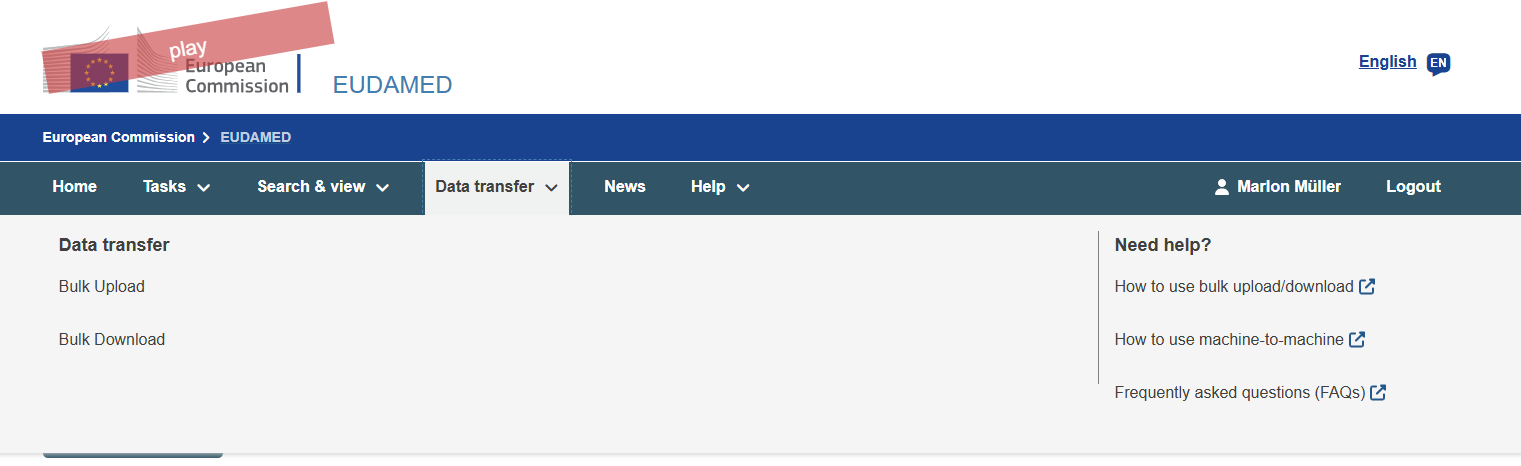
To register your Basic UDI select the service "Upload of Legacy / Regulation Device / SPP" and upload the Basic UDI Registration XML.
If your device has more than one variant (UDI-DIs), you need to register them in a second step. Please wait until the first upload succeeded and then click on "New Upload" again. To register the UDI-DIs, select the service "Upload of UDI-DI / Master UDI-DI for existing Basic UDI" and upload the UDI-DI Registration XML.
How to enter the information into CertHub
To generate the XML CertHub needs to know where to find the information required for EUDAMED. As most of this information will be stored inside the Knowledge Topics, CertHub uses a special attribute to find the relevant information in your product database. If you are using the templates that our team provided for you, these attributes are already set correctly. Only if you made substantial changes to our templates or created your own schemes do you need to set them manually.
Set the reference attribute
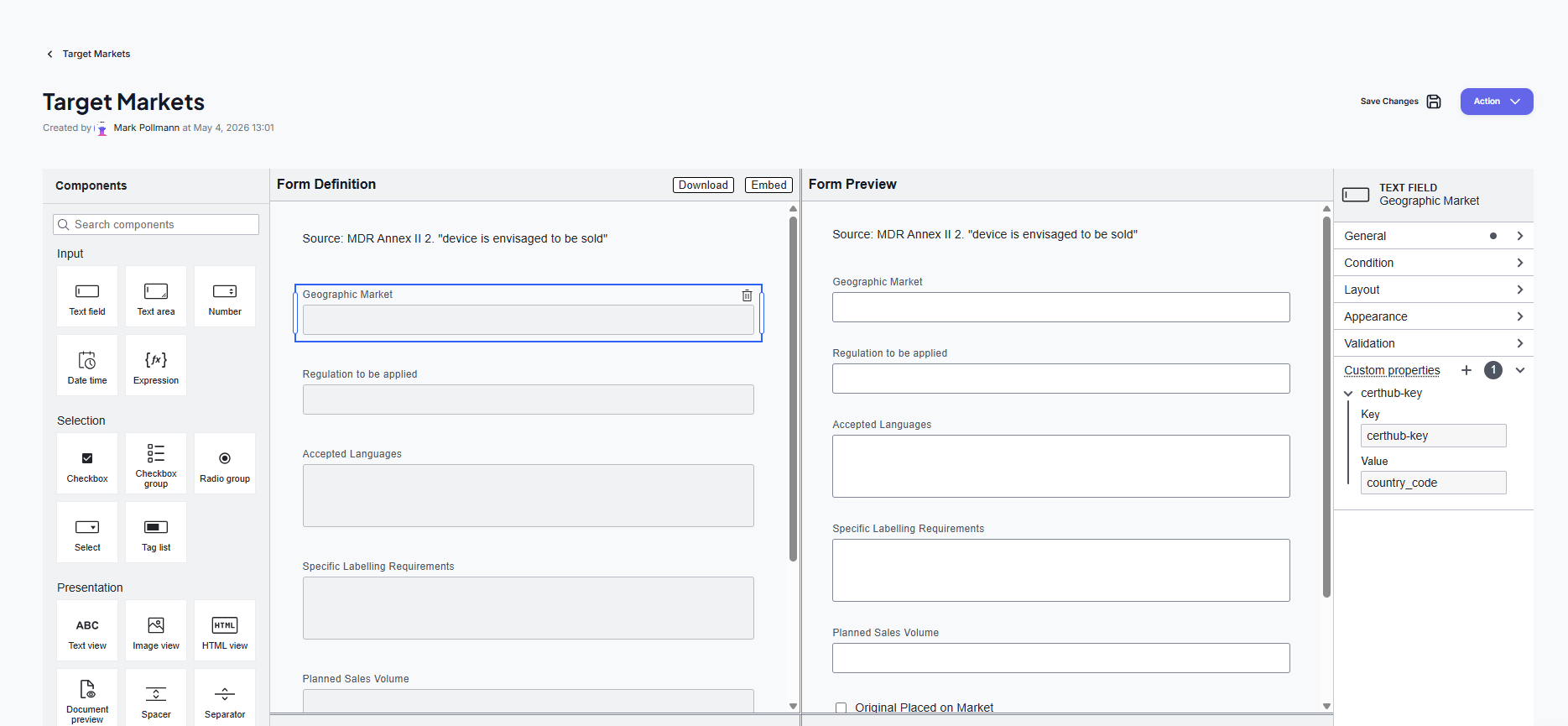
To set the reference attribute, head to the KT editor and add or select the form field where the required information will be stored. In the sidebar go to "Custom Properties" and add a new entry. As key enter "certhub-key" and fill the value with the specified reference. You can find a full list of all required CertHub Keys below.
Required References
All references that CertHub uses to generate your XML are listed here. Please make sure that you use the right field type (Text, Date, Checkbox or Number) in your KT forms. Unless stated otherwise, the system expects the certhub-keys to be present in the KT that is specified in the table below, make sure that the name of the KT matches the name specified in the table. If you use the templates provided by CertHub, the certhub-keys are present in these KTs.
| KT | Single / Multi | CertHub Key | Expected Form Field | Remarks |
|---|---|---|---|---|
| Global Element: Company Information | Global Element | information | Text | Set this field in the entry where you specify what information you store in this record. (e.g. SRN, Company Name, etc.) |
| Global Element: Company Information | Global Element | details | Text | |
| Target Markets | Multi | country_code | Text | Only one Country Code (e.g. DE, AT, etc.) per record |
| Target Markets | Multi | original_placed_on_the_market | Checkbox | |
| Target Markets | Multi | start_date | Date | |
| Target Markets | Multi | end_date | Date | |
| UDI Management | Multi | udi_di | Text | Needs to be a valid UDI-DI |
| UDI Management | Multi | udi_di_issuer | Text/Select | Valid values: GS1; IFA; HIBCC; ICCBBA |
| UDI Management | Multi | base_quantity | Number | |
| UDI Management | Multi | pielements | Text/Tag List | Valid values: BATCH_NUMBER; SOFTWARE_IDENTIFICATION; EXPIRATION_DATE; MANUFACTURING_DATE. If you use multiple UDI-PI Elements for a single UDI-DI, use a Tag List |
| UDI Management | Multi | new_device | Checkbox | Only for IVDR devices |
| Variants/Configurations | Multi | emdn_codes | Text | Needs to be valid EMDN Codes; if more than one applies to your product, separate them by comma. A full list of valid EMDN Codes can be found at the European Comission. |
| Variants/Configurations | Multi | infinite_reuses | Checkbox / Radio Group | Optional; must be either a checkbox or a Radio Group with valid Values: Yes, No. If Yes, the number_of_reuses can be left empty and will be treated as -1 |
| Variants/Configurations | Multi | number_of_reuses | Number | Must be either 0 for single-use products, a positive number for reusable products with a limited number of reuses or -1 for infinite reuses |
| Variants/Configurations | Multi | sterile | Checkbox | |
| Variants/Configurations | Multi | sterilization | Checkbox | |
| Variants/Configurations | Multi | reference_number | Text | |
| Variants/Configurations | Multi | variant_description | Text | |
| Variants/Configurations | Multi | name | Text | |
| Variants/Configurations | Multi | latex | Checkbox | Only for MDR products |
| Clinical Evaluations | Multi | clinical_investigation_reference | Text | Only required if Class IIb or III |
| Clinical Evaluations | Multi | non_euapplicable_countries | Text | Only required if Class IIb or III |
| Device Characteristics¹ | Single | animal_tissue_cells | Checkbox | |
| Device Characteristics¹ | Single | human_tissue_cells | Checkbox | |
| Device Characteristics¹ | Single | human_medicinal_product | Checkbox | |
| Device Characteristics¹ | Single | administering_medicine | Checkbox | |
| Device Characteristics¹ | Single | device_type | Text/Select | Valid values: DEVICE; PROCEDURE_PACK; SYSTEM |
| Intended Use Statement¹ | Single | general_description | Text | |
| Device Characteristics¹ | Single | companion_diagnostics | Checkbox | Only for IVDR |
| Device Characteristics¹ | Single | instrument | Checkbox | Only for IVDR |
| Device Characteristics¹ | Single | kit | Checkbox | Only for IVDR |
| Device Characteristics¹ | Single | microbial_substances | Checkbox | Only for IVDR |
| Device Characteristics¹ | Single | design_type | Checkbox Group / Tag List | Only for IVDR; Valid Values: Self-Testing, Near-Patient-Testing, Professional-Testing, General-Laboratory Use |
¹ KT-location is not mandatory. The specified KTs are a suggestion where to store the information. If you use the templates provided by CertHub, the certhub-keys are present in these KTs.
Fix Validation Errors
CertHub performs Validation Checks on your data before downloading the EUDAMED XML. The table below lists all potential errors and ways to fix them.
| ID | Error Message | Root Cause | How to fix |
|---|---|---|---|
| 1 | The variant {Variant ID} does not contain a valid value for the latex field. | The checkbox with the certhub-key "latex" either does not exist inside the "Configuration/Variants" KT or does not contain a valid value. | Make sure that the checkbox with the certhub-key "latex" exists inside the "Variants/Configurations" KT. The field needs to be a checkbox, no other input types are allowed. If the checkbox exists and this error persists, please open and save the variant again. |
| 2 | Certificate type is missing. Please add the certificate type in the corresponding entry of the "Issued Certificates" KT. | The certhub-key "certificate_type" is missing or contains an empty value in the "Issued Certificates" KT. | Add the certhub-key "certificate_type" to the "Issued Certificates" KT and enter a valid certificate type. |
| 3 | Invalid certificate type '{Certificate Type}' for {Regulation of your Product}. Please correct the certificate type entry. Valid values are: {Valid Values}. | The certificate type is not one of the valid values for the specified regulation. | Correct the value of the field with the certhub-key "certificate_type" in the KT "Issued Certificates" to be one of the valid values. |
| 4 | Invalid or missing Notified Body actor code '{Invalid Code}' for certificate '{Certificate Number}'. The Notified Body actor code is mandatory and must be exactly 4 digits. | The certhub-key "nb_identifier" in the KT "Issued Certificates" is either missing or does not contain a 4-digit Notified Body actor code. | Add the certhub-key "nb_identifier" to the KT "Issued Certificates" and enter a valid 4-digit Notified Body actor code. You can find the Actor Code for the Notified Bodies on the website of the European Commission for MDR and IVDR. |
| 5 | Products of risk class {Risk Class} must have at least one issued certificate for EUDAMED XML generation. Please add at least one entry to the 'Issued Certificates' multi-record KT. | The product needs a certificate issued by a Notified Body, but the "Issued Certificates" KT does not contain any records. A certificate is required for MDR class III devices, MDR class IIb devices that are implantable, IVDR class D devices and IVDR class C devices that are intended for self-testing or near-patient testing. | Add at least one record to the "Issued Certificates" multi-record KT with a valid certificate for the product. If you think the product does not need a certificate, please check the regulatory properties: for MDR class IIb the "implantable" property decides whether a certificate is required, for IVDR class C the design type (self-testing / near-patient testing) does. |
| 6 | Products must have at least one variant or configuration for EUDAMED XML generation. | The "Variants/Configurations" KT does not contain any records. | Add at least one record to the "Variants/Configurations" KT. If you only have one variant, you can add a single record with the required information. If the current product is the variant and you use the product family to store general information about the Basic-UDI, make sure to generate the EUDAMED XML from within the product family. |
| 7 | Products must have at least one market entry for EUDAMED XML generation. | The "Target Markets" KT does not contain any records. | Add at least one record to the "Target Markets" KT with a valid EU country code. |
| 8 | Products must have UDI-DI information for EUDAMED XML generation. | No UDI-DIs were found in the "UDI Management" or "Variants/Configurations" KTs. | Make sure that either the Multi-KT "UDI Management" exists and contains at least one record, or that the "Variants/Configurations" KT contains the certhub-key "udi_di" and "udi_di_issuer" |
| 9 | Products must have a Basic UDI for EUDAMED XML generation. | No Basic UDI was found in the product. | Add the correct Basic UDI to the metadata of your product. |
| 10 | Products must have an issuing entity for the UDI for EUDAMED XML generation. | The issuer of the Basic UDI was not found in the product metadata. | Add the correct issuer of the Basic UDI to the metadata of your product. |
| 11 | To upload the product to EUDAMED, please enter the manufacturer's SRN in the Company Information Global Element. | The SRN of the manufacturer was not found in the "Company Information" Global Element. | Add the correct SRN of the manufacturer to the "Company Information" Global Element. For the system to be able to find the SRN, the Global Element needs to contain the certhub-keys "information" and "details". For the Record containing the SRN the field with the certhub-key "information" needs to contain the value "SRN" and the field with the certhub-key "details" needs to contain the SRN. |
| 12 | The checkbox with the certhub-key 'animal_tissue_cells' is missing or contains an invalid value. | The checkbox with the certhub-key "animal_tissue_cells" either does not exist or does not contain a valid value. | Make sure that the checkbox with the certhub-key "animal_tissue_cells" exists, we suggest to put the field in the "Device Characteristics" KT. The field needs to be a checkbox, no other input types are allowed. If the checkbox exists and this error persists, please open and save the KT again. |
| 13 | The checkbox with the certhub-key 'human_tissue_cells' is missing or contains an invalid value. | The checkbox with the certhub-key "human_tissue_cells" either does not exist or does not contain a valid value. | Make sure that the checkbox with the certhub-key "human_tissue_cells" exists, we suggest to put the field in the "Device Characteristics" KT. The field needs to be a checkbox, no other input types are allowed. If the checkbox exists and this error persists, please open and save the KT again. |
| 14 | The product is marked as containing a medicinal product, but the checkbox with the certhub-key 'human_medicinal_product' is missing or contains an invalid value. | The checkbox with the certhub-key "human_medicinal_product" either does not exist or does not contain a valid value in a product that contains a medicinal product (according to the regulatory properties) | Make sure that the checkbox with the certhub-key "human_medicinal_product" exists, we suggest to put the field in the "Device Characteristics" KT. The field needs to be a checkbox, no other input types are allowed. If the checkbox exists and this error persists, please open and save the KT again. |
| 15 | The checkbox with the certhub-key 'administering_medicine' is missing or contains an invalid value. | The checkbox with the certhub-key "administering_medicine" either does not exist or does not contain a valid value. | Make sure that the checkbox with the certhub-key "administering_medicine" exists, we suggest to put the field in the "Device Characteristics" KT. The field needs to be a checkbox, no other input types are allowed. If the checkbox exists and this error persists, please open and save the KT again. |
| 16 | The device type information is missing. Please add the certhub-key 'device_type' to the product's knowledge topics. Valid values are: {Valid Values}. | The certhub-key "device_type" is missing. | Add the certhub-key "device_type" to the product's knowledge topics and enter a valid text value, we suggest to put the field in the "Device Characteristics" KT. Valid values are: DEVICE; PROCEDURE_PACK; SYSTEM |
| 17 | The device type entry is not valid. Please correct the value in 'device_type'. Valid values are: {Valid Values} | The certhub-key "device_type" is present but does not contain a valid value. | Correct the value of the field with the certhub-key "device_type" to be one of the valid values. Valid values are: DEVICE; PROCEDURE_PACK; SYSTEM |
| 18 | The checkbox with the certhub-key 'companion_diagnostics' is missing or contains an invalid value. | The checkbox with the certhub-key "companion_diagnostics" either does not exist or does not contain a valid value. | Make sure that the checkbox with the certhub-key "companion_diagnostics" exists, we suggest to put the field in the "Device Characteristics" KT. The field needs to be a checkbox, no other input types are allowed. If the checkbox exists and this error persists, please open and save the KT again. |
| 19 | The checkbox with the certhub-key 'instrument' is missing or contains an invalid value. | The checkbox with the certhub-key "instrument" either does not exist or does not contain a valid value. | Make sure that the checkbox with the certhub-key "instrument" exists, we suggest to put the field in the "Device Characteristics" KT. The field needs to be a checkbox, no other input types are allowed. If the checkbox exists and this error persists, please open and save the KT again. |
| 20 | The checkbox with the certhub-key 'kit' is missing or contains an invalid value. | The checkbox with the certhub-key "kit" either does not exist or does not contain a valid value. | Make sure that the checkbox with the certhub-key "kit" exists, we suggest to put the field in the "Device Characteristics" KT. The field needs to be a checkbox, no other input types are allowed. If the checkbox exists and this error persists, please open and save the KT again. |
| 21 | The checkbox with the certhub-key 'microbial_substances' is missing or contains an invalid value. | The checkbox with the certhub-key "microbial_substances" either does not exist or does not contain a valid value. | Make sure that the checkbox with the certhub-key "microbial_substances" exists, we suggest to put the field in the "Device Characteristics" KT. The field needs to be a checkbox, no other input types are allowed. If the checkbox exists and this error persists, please open and save the KT again. |
| 22 | The design type information is missing. Please add the certhub-key 'design_type' to the product's knowledge units. Valid Values are: "Self-Testing", "Near-Patient-Testing", "Professional-Testing" | The certhub-key "design_type" is missing. | Add the certhub-key "design_type" to the product's knowledge units and enter a valid text value, we suggest to put the field in the "Device Characteristics" KT. Valid values are: Self-Testing, Near-Patient-Testing, Professional-Testing. If more than one of these values apply to your product, use a checkbox group or a tag selection field in the KT. |
| 23 | If a product family contains variants, each variant must have market information and UDI-DI information linked via the Tracer. | The product family contains variants, but at least one variant does not have market information or UDI-DI information linked via the Tracer. | Make sure that the KTs "Target Markets" and "UDI Management" exist, both having records and that the records are linked to their corresponding Variants from the Variants/Configurations KT. |
| 24 | If a product in the family does not contain variants, enter the UDI-DI in the product metadata. Please make sure the 'UDI Management' multi-record KT does not contain any UDI-DI entries for {Product Name}. | The product belongs to a product family and does not contain any variants in the "Variants/Configurations" KT, but the "UDI Management" KT contains UDI-DI entries for the product. | An empty "Variants/Configurations" KT inside a product that belongs to a product family means that the product fanily carries the Basic UDI and the Product carries the UDI-DI. Make sure that the "UDI Management" KT does not contain any UDI-DI entries for the product. If the product does not contain variants, enter the UDI-DI in the product metadata instead. |
| 25 | Each variant of a Basic UDI must have an UDI-DI. | The product belongs to a product family and does not contain any variants in the "Variants/Configurations" KT, but the UDI-DI is missing in the product metadata. | An empty "Variants/Configurations" KT inside a product that belongs to a product family means that the product fanily carries the Basic UDI and the Product carries the UDI-DI. Make sure that the UDI-DI is entered in the product metadata. |
| 26 | All variants of a Basic UDI must have an UDI-DI issuer. | The product belongs to a product family and does not contain any variants in the "Variants/Configurations" KT, but the UDI-DI issuer is missing in the product metadata. | An empty "Variants/Configurations" KT inside a product that belongs to a product family means that the product fanily carries the Basic UDI and the Product carries the UDI-DI. Make sure that the UDI-DI issuer is entered in the product metadata. |
| 27 | The product {Product Name} does not contain any EMDN codes. Please add the certhub-key 'emdn_codes' to the product or the product family and enter at least one valid EMDN code. | The product belongs to a product family and does not contain any variants, so the product itself carries the UDI-DI. No field with the certhub-key "emdn_codes" was found in the KTs of the product or of the product family. | Add a field with the certhub-key "emdn_codes" to a KT of the product or of the product family and enter at least one valid EMDN code. If more than one EMDN code applies, separate them by comma or use a tag list. A full list of valid EMDN Codes can be found at the European Comission. |
| 28 | The product {Product Name} is marked as reusable, but does not contain a valid number of reuses. Please enter a single positive whole number in the field with the certhub-key 'number_of_reuses'. | The regulatory properties mark the product as reusable, but the field with the certhub-key "number_of_reuses" is missing, exists more than once in the KTs of the product and the product family, or does not contain a positive whole number. | Add a single number field with the certhub-key "number_of_reuses" to a KT of the product or of the product family and enter the maximum number of reuses. Please note that in this case the value must be greater than 0: the "infinite_reuses" toggle and the value -1 are only supported for variants inside the "Variants/Configurations" KT. If the product is not reusable, correct the "reusable" regulatory property instead. |
| 29 | The product {Product Name} does not contain a valid value for the sterile field. Please add a single checkbox with the certhub-key 'sterile' to the product or the product family. | The checkbox with the certhub-key "sterile" is missing, exists more than once in the KTs of the product and the product family, or does not contain a valid value. | Make sure that exactly one checkbox with the certhub-key "sterile" exists in the KTs of the product or of the product family. The field needs to be a checkbox, no other input types are allowed. If the checkbox exists and this error persists, please open and save the KT again. |
| 30 | The product {Product Name} is marked as sterile, but does not contain a valid value for the sterilization field. Please add a single checkbox with the certhub-key 'sterilization' to the product or the product family. | The product is marked as sterile, but the checkbox with the certhub-key "sterilization" is missing, exists more than once in the KTs of the product and the product family, or does not contain a valid value. | Make sure that exactly one checkbox with the certhub-key "sterilization" exists in the KTs of the product or of the product family. The field needs to be a checkbox, no other input types are allowed. If the product is not sterile, correct the value of the "sterile" checkbox instead. |
| 31 | The base quantity of the product {Product Name} is not valid. The field with the certhub-key 'base_quantity' must contain a single positive whole number. | The field with the certhub-key "base_quantity" contains a value that is not a positive whole number, or it exists more than once in the KTs of the product and the product family. | The base quantity is optional: either remove the value, or make sure that exactly one number field with the certhub-key "base_quantity" exists and contains a positive whole number. |
| 32 | The product {Product Name} does not contain any UDI-PI elements. Please add the certhub-key 'pielements' to the product or the product family and enter at least one valid UDI-PI element. | No field with the certhub-key "pielements" was found in the KTs of the product or of the product family, or the field is empty. | Add a field with the certhub-key "pielements" to a KT of the product or of the product family. Valid values are: BATCH_NUMBER; SOFTWARE_IDENTIFICATION; EXPIRATION_DATE; MANUFACTURING_DATE. If you use more than one UDI-PI element, use a Tag List. |
| 33 | The product {Product Name} contains invalid UDI-PI elements. Please correct the value in 'pielements'. Valid values are: {Valid Values} | The field with the certhub-key "pielements" contains at least one value that is not a valid UDI-PI element. | Correct the values of the field with the certhub-key "pielements". Valid values are: BATCH_NUMBER; SOFTWARE_IDENTIFICATION; EXPIRATION_DATE; MANUFACTURING_DATE. |
| 34 | The product {Product Name} does not contain a valid value for the latex field. Please add a single checkbox with the certhub-key 'latex' to the product or the product family. | Only for MDR products: the checkbox with the certhub-key "latex" is missing, exists more than once in the KTs of the product and the product family, or does not contain a valid value. | Make sure that exactly one checkbox with the certhub-key "latex" exists in the KTs of the product or of the product family. The field needs to be a checkbox, no other input types are allowed. If the checkbox exists and this error persists, please open and save the KT again. |
| 35 | Product families must have at least one product for EUDAMED XML generation. | The EUDAMED XML was generated from a product family that does not contain any products. | Add at least one product to the product family. If the Basic UDI is carried by the product itself, generate the EUDAMED XML from the product instead of from the product family. |
| 36 | At least one product in the product family must have valid UDI-DI information for EUDAMED XML generation. | None of the products in the product family provided the UDI-DI information needed for the XML. | This error is always shown together with the errors of the individual products. Fix those errors first, this error will then disappear as well. |
| 37 | The checkbox with the certhub-key 'near_patient_testing' is missing or contains an invalid value. | Only for IVDR product families: the checkbox with the certhub-key "near_patient_testing" either does not exist or does not contain a valid value. | Make sure that the checkbox with the certhub-key "near_patient_testing" exists in a KT of the product family, we suggest to put the field in the "Device Characteristics" KT. The field needs to be a checkbox, no other input types are allowed. Please note that a single IVDR product uses the certhub-key "design_type" instead (see ID 22). |
| 38 | The checkbox with the certhub-key 'professional_testing' is missing or contains an invalid value. | Only for IVDR product families: the checkbox with the certhub-key "professional_testing" either does not exist or does not contain a valid value. | Make sure that the checkbox with the certhub-key "professional_testing" exists in a KT of the product family, we suggest to put the field in the "Device Characteristics" KT. The field needs to be a checkbox, no other input types are allowed. Please note that a single IVDR product uses the certhub-key "design_type" instead (see ID 22). |
| 39 | The checkbox with the certhub-key 'self_testing' is missing or contains an invalid value. | Only for IVDR product families: the checkbox with the certhub-key "self_testing" either does not exist or does not contain a valid value. | Make sure that the checkbox with the certhub-key "self_testing" exists in a KT of the product family, we suggest to put the field in the "Device Characteristics" KT. The field needs to be a checkbox, no other input types are allowed. Please note that a single IVDR product uses the certhub-key "design_type" instead (see ID 22). |
| 40 | Product families must have a Basic UDI for EUDAMED XML generation. | The EUDAMED XML was generated from a product family, but no Basic UDI was found in the metadata of the product family. | Add the correct Basic UDI to the metadata of your product family. If the Basic UDI is carried by the product instead of the product family, generate the EUDAMED XML from the product. |
| 41 | Product families must have an issuing entity for the Basic UDI for EUDAMED XML generation. | The EUDAMED XML was generated from a product family, but the issuer of the Basic UDI was not found in the metadata of the product family. | Add the correct issuer of the Basic UDI to the metadata of your product family. |
| 42 | The device is marked as single-use in the regulatory properties, but the field with the certhub-key 'number_of_reuses' contains a number greater than 0. Please correct this contradiction. | The regulatory property "reusable" is set to single-use, but a number of reuses greater than 0 was entered. EUDAMED only accepts a maximum number of reuses for devices that are not single-use. | Either correct the "reusable" regulatory property of the device, or remove the value from the field with the certhub-key "number_of_reuses" (or set it to 0). |
| 43 | No Global Elements were found for your tenant. Please create a 'Company Information' Global Element and store the manufacturer SRN in it. | There is no Global Element at all in your CertHub instance, so the manufacturer SRN cannot be read. This error always appears together with ID 11. | Create a Global Element named "Company Information" and add fields with the certhub-keys "information" and "details" to it. Then add a record with the value "SRN" in the "information" field and your SRN in the "details" field. |
| 44 | No Global Element named 'Company Information' with a form was found. Please create a Global Element with exactly this name and add the fields needed to store the manufacturer SRN. | Global Elements exist, but none of them is named exactly "Company Information", or the one that is does not have a form yet. This error always appears together with ID 11. | Create or rename a Global Element so that it is named exactly "Company Information" and make sure it contains a form with the fields carrying the certhub-keys "information" and "details". |
| 45 | The 'Company Information' Global Element does not contain the certhub-keys 'information' and 'details'. Please add both fields so the manufacturer SRN can be read. | The "Company Information" Global Element exists, but its form does not contain a field with the certhub-key "information" and/or a field with the certhub-key "details". This error always appears together with ID 11. | Add both fields to the form of the "Company Information" Global Element. The field with the certhub-key "information" says which information a record holds, the field with the certhub-key "details" holds the value itself. |
| 46 | The 'Company Information' Global Element does not contain any records. Please add a record with the value 'SRN' in the field with the certhub-key 'information' and the manufacturer SRN in the field with the certhub-key 'details'. | The "Company Information" Global Element is set up correctly, but no records have been entered yet. This error always appears together with ID 11. | Add a record to the "Company Information" Global Element in which the field with the certhub-key "information" contains the value "SRN" and the field with the certhub-key "details" contains your SRN. |
| 47 | The 'Company Information' Global Element does not contain a record whose field with the certhub-key 'information' has the value 'SRN'. Please add such a record and enter the manufacturer SRN in the field with the certhub-key 'details'. | The "Company Information" Global Element contains records, but none of them is marked as the SRN record. This error always appears together with ID 11. | Add a record in which the field with the certhub-key "information" contains exactly the value "SRN" and enter your SRN in the field with the certhub-key "details". Please note that the value is case-sensitive. |
| 48 | The SRN record of the 'Company Information' Global Element is empty. Please enter the manufacturer SRN in the field with the certhub-key 'details'. | The record marked with "SRN" exists, but its field with the certhub-key "details" is empty. This error always appears together with ID 11. | Enter your manufacturer SRN in the field with the certhub-key "details" of the SRN record. |
| 49 | The UDI-DI entry does not have any trace links. Each UDI-DI entry must be trace-linked to the variant entry it belongs to. | The device stores its UDI-DIs in a separate "UDI Management" KT, but the UDI-DI record is not connected to any other record via the Tracer, so CertHub cannot tell which variant it belongs to. This error always appears together with ID 64. | Open the Tracer and create a trace link between the UDI-DI entry in the "UDI Management" KT and the entry it belongs to in the "Variants/Configurations" KT. |
| 50 | The UDI-DI entry is trace-linked to more than one variant entry. Each UDI-DI entry may only be linked to exactly one variant entry. | The UDI-DI record in the "UDI Management" KT is connected to several records of the "Variants/Configurations" KT via the Tracer. A UDI-DI always belongs to exactly one variant. This error always appears together with ID 64. | Open the Tracer and remove the trace links to all variants the UDI-DI does not belong to, so that exactly one link remains. |
| 51 | The market {Country Code} has more than one metadata entry linked to it. Each combination of a market and a variant may only have one entry of the 'Target Markets Metadata' KT trace-linked to it. | An entry of the "Target Markets Metadata" KT holds the start date, the end date and the original market flag for one market of one variant. CertHub therefore uses the metadata entry that is trace-linked to the market entry and to the variant entry at the same time. Here more than one metadata entry is linked to both of them, so CertHub cannot tell which dates to use. | Open the Tracer and look at the market named in the error message. For each variant there may only be one metadata entry that is linked to this market and to this variant at the same time. Remove the trace links of the surplus entries, or delete those entries. Example: if you sell variant A and variant B in Germany, you need two metadata entries: one linked to Germany and to variant A, the other linked to Germany and to variant B. Two entries that are both linked to Germany and to variant A cause this error. |
| 52 | The UDI-DI must be available in at least one EU market. Please add at least one entry with a valid EU country code to the 'Target Markets' KT. | No market with a valid EU country code was found for this UDI-DI. Markets outside the EU are ignored for EUDAMED, and for devices with variants only the markets that are trace-linked to the variant are taken into account. | Add an entry with a valid EU country code (e.g. DE, AT, FR) to the "Target Markets" KT and, if the device has variants, trace-link it to the corresponding variant. Devices of risk class I and class A do not need a market entry. |
| 53 | Exactly one market entry must be marked as the market where the device was first placed on the market. Please make sure that the checkbox with the certhub-key 'original_placed_on_the_market' is set in exactly one of the linked 'Target Markets' entries. | None of the market entries, or more than one of them, has the checkbox with the certhub-key "original_placed_on_the_market" set. EUDAMED expects exactly one original market per UDI-DI. | Set the checkbox with the certhub-key "original_placed_on_the_market" in exactly one "Target Markets" entry (or in its "Target Markets Metadata" entry) and remove it from all others. |
| 54 | MDR devices must have a valid risk class according to MDR (I, IIa, IIb, III). Please correct the risk class in the regulatory properties of the device. | The device is registered under MDR, but its risk class is not one of the MDR classes I, IIa, IIb or III, for example because an IVDR class (A to D) was selected. | Open the regulatory properties of the device and select a risk class that is valid for MDR: I, IIa, IIb or III. If the device is an in-vitro diagnostic device, change the regulation to IVDR instead. |
| 55 | The regulatory property 'active' is not filled in. Please set it to yes or no in the regulatory properties of the device. | Only for MDR devices: the regulatory property "active" is empty, but EUDAMED requires a yes or no value. | Open the regulatory properties of the device and set "active" to yes or no. |
| 56 | The regulatory property 'measurement' is not filled in. Please set it to yes or no in the regulatory properties of the device. | Only for MDR devices: the regulatory property "measurement" is empty, but EUDAMED requires a yes or no value. | Open the regulatory properties of the device and set "measurement" to yes or no. |
| 57 | The regulatory property 'reusable' is not filled in. Please select in the regulatory properties of the device whether it is a single-use device, a reusable surgical instrument or otherwise reusable. | Only for MDR devices: the regulatory property "reusable" is empty. CertHub needs it to decide whether a maximum number of reuses has to be reported to EUDAMED. | Open the regulatory properties of the device and select one of the values "Single Use", "Surgical Reusable Instrument" or "Other". |
| 58 | The regulatory property 'sterile' is not filled in. Please set it to yes or no in the regulatory properties of the device. | Only for MDR devices: the regulatory property "sterile" is empty, but EUDAMED requires a yes or no value. | Open the regulatory properties of the device and set "sterile" to yes or no. |
| 59 | The regulatory property 'implantable' is not filled in. Please set it to yes or no in the regulatory properties of the device. | Only for MDR devices: the regulatory property "implantable" is empty, but EUDAMED requires a yes or no value. It also decides whether a class IIb device needs a certificate (see ID 5). | Open the regulatory properties of the device and set "implantable" to yes or no. |
| 60 | The regulatory property 'medicinal product' is not filled in. Please set it to yes or no in the regulatory properties of the device. | Only for MDR devices: the regulatory property "medicinal product" is empty, but EUDAMED requires a yes or no value. If it is set to yes, the checkbox with the certhub-key "human_medicinal_product" is required as well (see ID 14). | Open the regulatory properties of the device and set "medicinal product" to yes or no. |
| 61 | The regulatory property 'reprocessing' is not filled in. Please set it to yes or no in the regulatory properties of the device. | Only for MDR devices: the regulatory property "reprocessing" is empty, but EUDAMED requires a yes or no value. | Open the regulatory properties of the device and set "reprocessing" to yes or no. |
| 62 | IVDR devices must have a valid risk class according to IVDR (A, B, C, D). Please correct the risk class in the regulatory properties of the device. | The device is registered under IVDR, but its risk class is not one of the IVDR classes A, B, C or D, for example because an MDR class (I to III) was selected. | Open the regulatory properties of the device and select a risk class that is valid for IVDR: A, B, C or D. If the device is not an in-vitro diagnostic device, change the regulation to MDR instead. |
| 63 | The regulatory property 'reagents' is not filled in. Please set it to yes or no in the regulatory properties of the device. | Only for IVDR devices: the regulatory property "reagents" is empty, but EUDAMED requires a yes or no value. | Open the regulatory properties of the device and set "reagents" to yes or no. |
| 64 | The UDI-DI entry is not linked to a variant entry. Please create or correct the tracer link so the UDI-DI points to exactly one Variant entry in Variants/Configurations. | CertHub could not determine which variant a UDI-DI entry belongs to. Either the UDI-DI entry has no trace links at all (see ID 49), it is linked to more than one variant (see ID 50), or its trace links point to records that are not variant entries. | Open the Tracer and make sure that the UDI-DI entry of the "UDI Management" KT is linked to exactly one entry of the "Variants/Configurations" KT. |
| 65 | The variant entry {Variant Name} has not been saved completely. Please open the variant entry and save it again so EUDAMED XML can be generated. | The variant record does not have an internal id yet, which means it was never saved successfully. | Open the "Variants/Configurations" KT, open the variant entry and save it again. If the error persists, please contact support. |
| 66 | The UDI-DI of the variant {Variant Name} is missing. Please enter it in the field with the certhub-key 'udi_di'. | The field with the certhub-key "udi_di" is empty or contains "N/A". Depending on your setup this field is either in the "UDI Management" KT or directly in the "Variants/Configurations" KT. | Enter a valid UDI-DI in the field with the certhub-key "udi_di" of the UDI-DI entry that belongs to this variant. |
| 67 | The UDI-DI issuer of the variant {Variant Name} is missing. Please enter it in the field with the certhub-key 'udi_di_issuer'. | The field with the certhub-key "udi_di_issuer" is empty or contains "N/A". | Enter the issuing entity of the UDI-DI in the field with the certhub-key "udi_di_issuer". Valid values are: GS1; IFA; HIBCC; ICCBBA. |
| 68 | The variant {Variant Name} does not contain any EMDN codes. Please enter at least one valid EMDN code in the field with the certhub-key 'emdn_codes'. | The field with the certhub-key "emdn_codes" of the variant entry is empty or does not exist. | Enter at least one valid EMDN code in the field with the certhub-key "emdn_codes" of the "Variants/Configurations" KT. If more than one code applies, separate them by comma or use a tag list. A full list of valid EMDN Codes can be found at the European Comission. |
| 69 | The variant {Variant Name} is marked as reusable, but does not contain a valid number of reuses. Please enter a number greater than 0 in the field with the certhub-key 'number_of_reuses', or -1 for an unlimited number of reuses. | The regulatory property "reusable" marks the device as reusable, but the field with the certhub-key "number_of_reuses" of the variant is empty or does not contain a valid number. | Enter the maximum number of reuses in the field with the certhub-key "number_of_reuses" of the variant. Enter -1 if the number of reuses is unlimited, or switch on the optional field with the certhub-key "infinite_reuses" instead. If the device is not reusable, correct the "reusable" regulatory property (see ID 57). |
| 70 | The variant {Variant Name} does not contain a valid value for the sterile field. Please fill in the checkbox with the certhub-key 'sterile' in the 'Variants/Configurations' KT. | The checkbox with the certhub-key "sterile" either does not exist inside the "Variants/Configurations" KT or does not contain a valid value. | Make sure that the checkbox with the certhub-key "sterile" exists inside the "Variants/Configurations" KT. The field needs to be a checkbox, no other input types are allowed. If the checkbox exists and this error persists, please open and save the variant again. |
| 71 | The variant {Variant Name} is marked as sterile, but does not contain a valid value for the sterilization field. Please fill in the checkbox with the certhub-key 'sterilization' in the 'Variants/Configurations' KT. | The variant is marked as sterile, but the checkbox with the certhub-key "sterilization" either does not exist inside the "Variants/Configurations" KT or does not contain a valid value. | Make sure that the checkbox with the certhub-key "sterilization" exists inside the "Variants/Configurations" KT. The field needs to be a checkbox, no other input types are allowed. If the variant is not sterile, correct the value of the "sterile" checkbox instead. |
| 72 | The base quantity of the variant {Variant Name} is not valid. The field with the certhub-key 'base_quantity' must contain a positive whole number. | The field with the certhub-key "base_quantity" contains a value that is not a positive whole number. | The base quantity is optional: either remove the value, or enter a positive whole number in the field with the certhub-key "base_quantity". |
| 73 | The variant {Variant Name} does not contain any UDI-PI elements. Please enter at least one valid UDI-PI element in the field with the certhub-key 'pielements'. | The field with the certhub-key "pielements" is empty or does not exist. | Enter at least one UDI-PI element in the field with the certhub-key "pielements". Valid values are: BATCH_NUMBER; SOFTWARE_IDENTIFICATION; EXPIRATION_DATE; MANUFACTURING_DATE. If you use more than one UDI-PI element, use a Tag List. |
| 74 | The variant {Variant Name} contains invalid UDI-PI elements. Please correct the value in 'pielements'. Valid values are: {Valid Values} | The field with the certhub-key "pielements" contains at least one value that is not a valid UDI-PI element. | Correct the values of the field with the certhub-key "pielements". Valid values are: BATCH_NUMBER; SOFTWARE_IDENTIFICATION; EXPIRATION_DATE; MANUFACTURING_DATE. |
| 75 | The variant {Variant Name} does not have a reference number. Please enter it in the field with the certhub-key 'reference_number'. | The field with the certhub-key "reference_number" of the variant entry is empty. EUDAMED requires a reference or catalogue number for each UDI-DI. | Enter the reference or catalogue number in the field with the certhub-key "reference_number" of the variant entry in the "Variants/Configurations" KT. |
| 76 | The variant {Variant Name} does not have any trace links to market entries. Please create a trace connection between the variant entry and the entries of the 'Target Markets' KT. | The variant record is not connected to any other record via the Tracer, so CertHub cannot tell in which markets this variant is available. | Open the Tracer and link the variant entry of the "Variants/Configurations" KT to the entries of the "Target Markets" KT that apply to it. |