Global Elements References
The Global Elements Referencer allows you to connect Global Elements to any other domain object in the system. This powerful feature ensures that standardized information can be consistently referenced across your entire platform.
Benefits of Global Element Referencing
- Data Consistency – Ensure the same standardized information is used across all domain objects
- Reduced Duplication – Reference existing information instead of recreating it
- Impact Analysis – Quickly see which objects would be affected by changes to a Global Element
- Improved Navigation – Move efficiently between related objects through their Global Element connections
- Comprehensive Traceability – Maintain a complete record of how information is used throughout your system
Global Element Tracer Component
The Global Element Tracer component is integrated throughout the system, allowing you to establish connections between Global Elements and other domain objects. This component appears in different locations depending on the context:
- As a tab in domain object detail views
- In detail drawers for quick reference
- Below input fields (e.g., for knowledge topics)
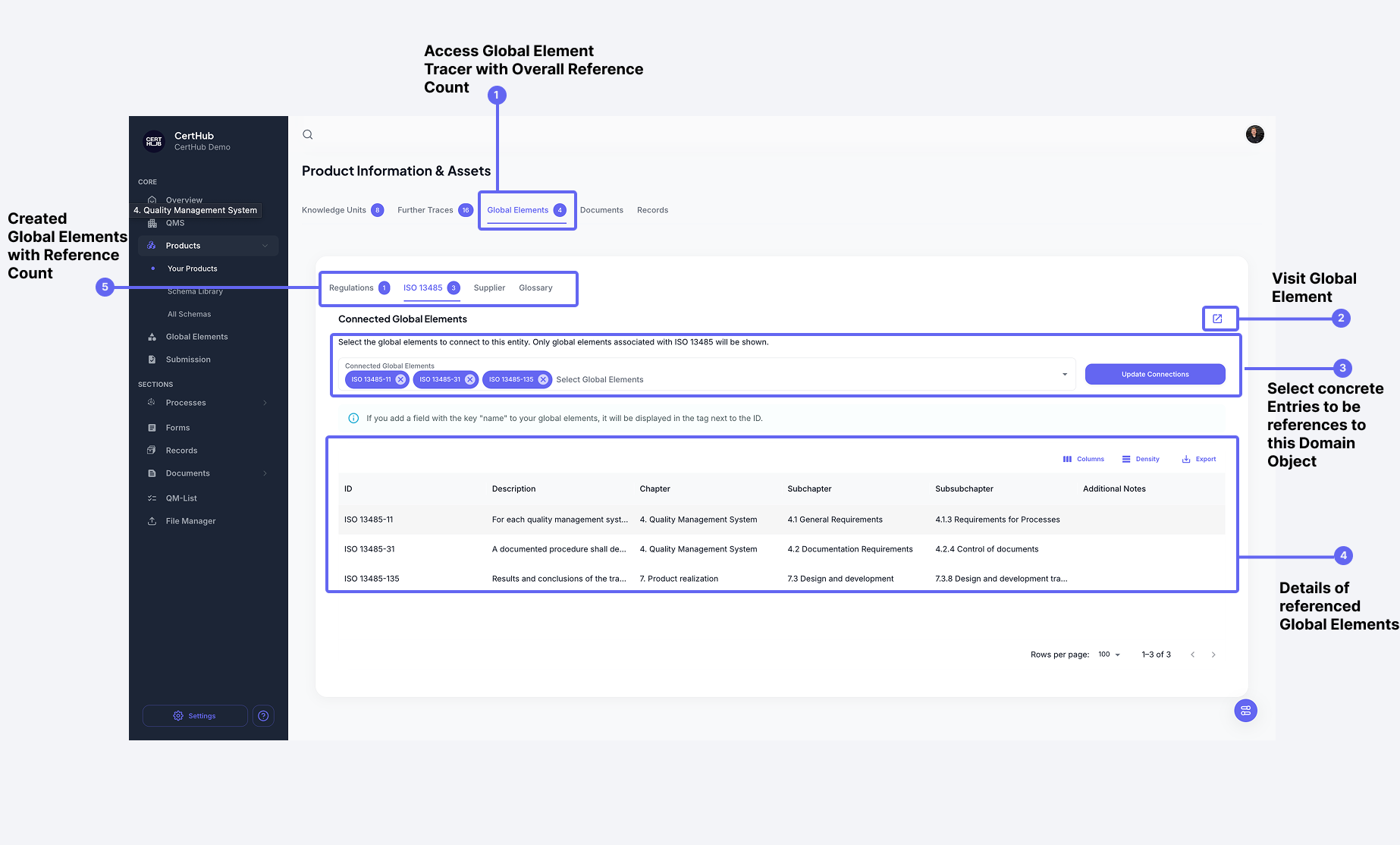 The Global Element Tracer component is used to create connections from domain objects to Global Elements
Key Features of the Tracer Component:
- Tabbed Interface – Each Global Element type has its own dedicated tab for easy navigation
- Dropdown Selection – Choose specific entries from each Global Element type to create references
- Intelligent Display – The system shows the name field when available, otherwise displays the ID for clear identification
- Bidirectional Tracing – When you reference a Global Element, the system automatically creates a bidirectional trace
The Tracer Component is where you actively create connections from your domain objects (like SOPs, Work Instructions, etc.) to Global Elements. Think of it as the tool you use to establish these important references.
Viewing Referenced Elements in the Drawer
When you view a specific Global Element, the system provides a drawer view that shows all objects that reference this particular element. This gives you a comprehensive overview of where and how this Global Element is being used across your platform.
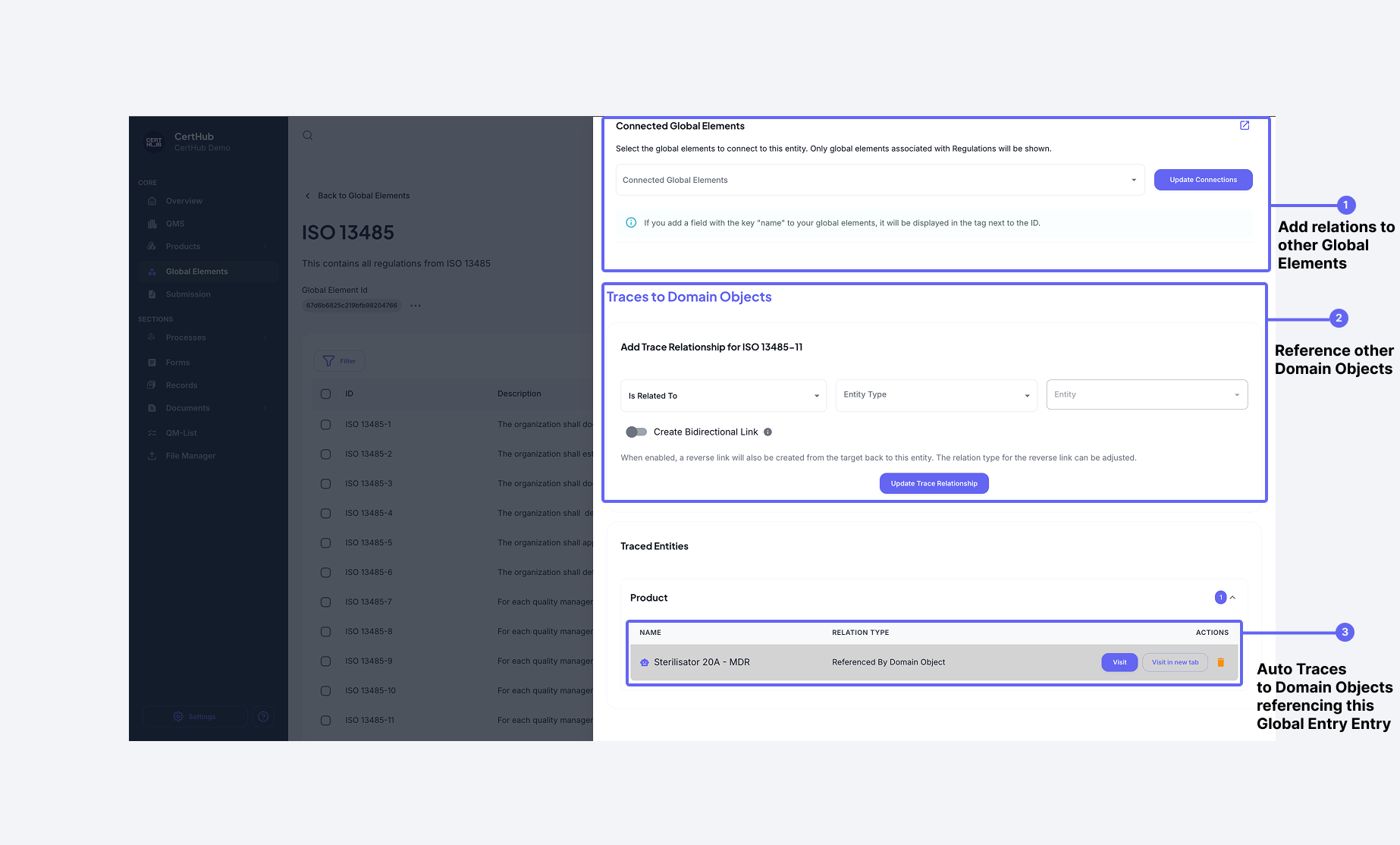 The Drawer view appears when viewing a specific Global Element, showing all domain objects that reference it
Working with the Drawer View:
- Quick Navigation – Click on any referenced element to navigate directly to that domain object
- Comprehensive Overview – The drawer view displays all objects that reference this specific Global Element
- Relationship Visibility – Easily see if all required connections are established (e.g., check if all regulations are properly traced)
- Bidirectional Access – From any Global Element, view all objects that reference it, and from any object, view all Global Elements it references
The Drawer View is particularly useful for impact analysis. Before making changes to a Global Element, check the drawer to see which domain objects would be affected by your changes.
Summary of the Referencing Process
- Create Connections – Use the Tracer Component in domain objects to establish references to Global Elements
- View Connections – Use the Drawer View when examining a specific Global Element to see all objects that reference it
- Navigate Through Connections – Click on references in either view to move quickly between related items