The Complete Guide to References in Text Editor
Introduction to References
In modern document management systems, maintaining accurate and up-to-date information across multiple documents can be challenging. The Text Editor's reference system provides an elegant solution to this challenge. References act as smart links that can pull information from various parts of your system - such as Products, SOPs, Forms, Work Instructions, Documents, and Templates - directly into your current document.
Think of references as dynamic bookmarks that not only point to information but can also display it in your document. When the source information changes, these references can automatically update to reflect those changes, ensuring your documents always contain the latest information.
Types of References
The Text Editor supports two main types of references, each serving different purposes in document creation and management.
Abstract References
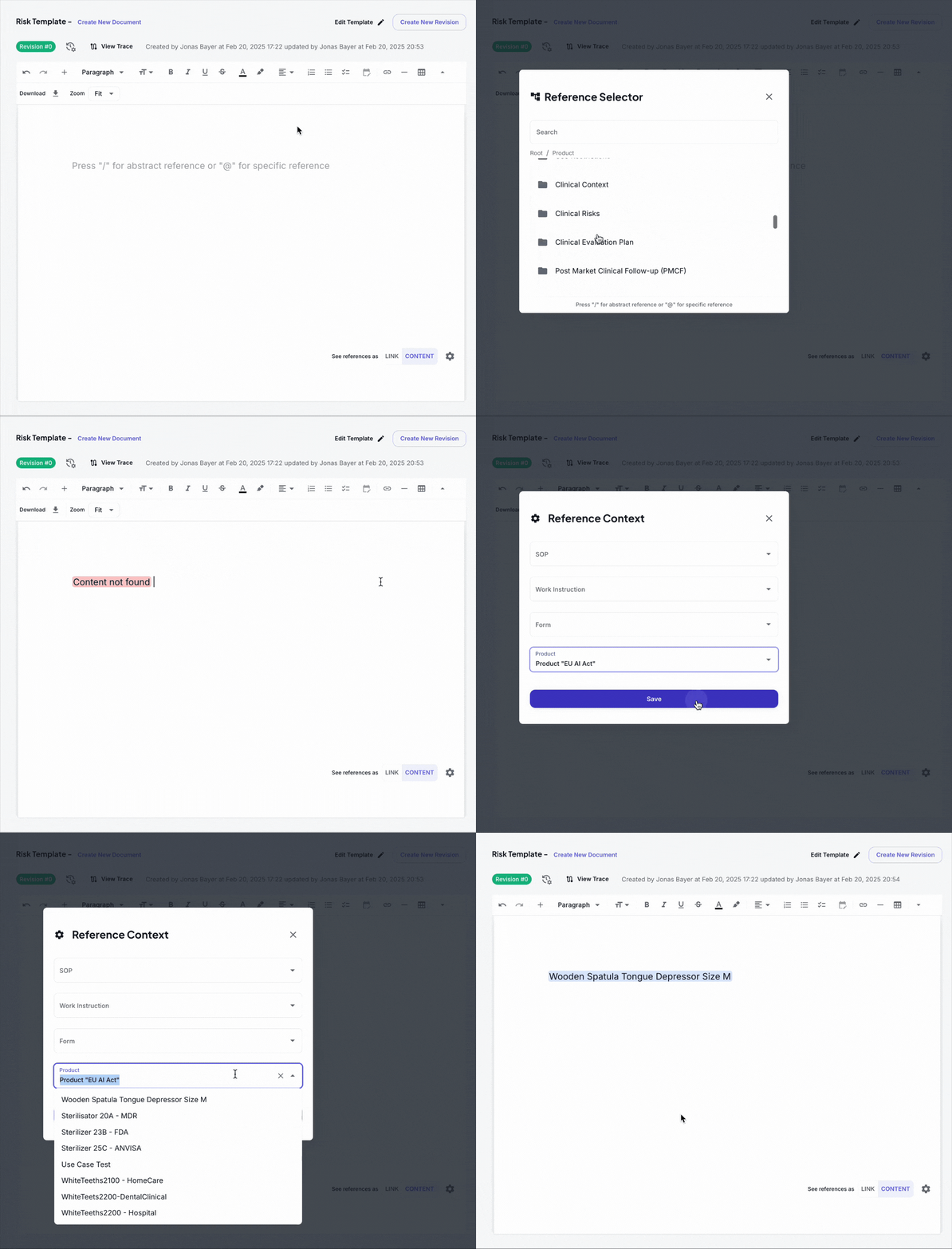
Abstract references, triggered by typing "/" in the editor, are the cornerstone of creating flexible, reusable documents. These references are particularly powerful because they're context-aware - their content changes based on your settings rather than being tied to a specific piece of information.
For example, imagine you're creating a template for product documentation. Instead of hardcoding a specific product name, you could use an abstract reference like /Product/Name. This reference will automatically display different product names based on what's selected in your Abstract Reference Settings. This means the same template can be reused for multiple products without any modifications to the document itself.
Abstract references are always dynamic, meaning they maintain a constant connection with their source content. When information changes in the source, all documents using that abstract reference will automatically reflect those changes. This feature makes abstract references invaluable for maintaining consistency across your documentation.
Specific References
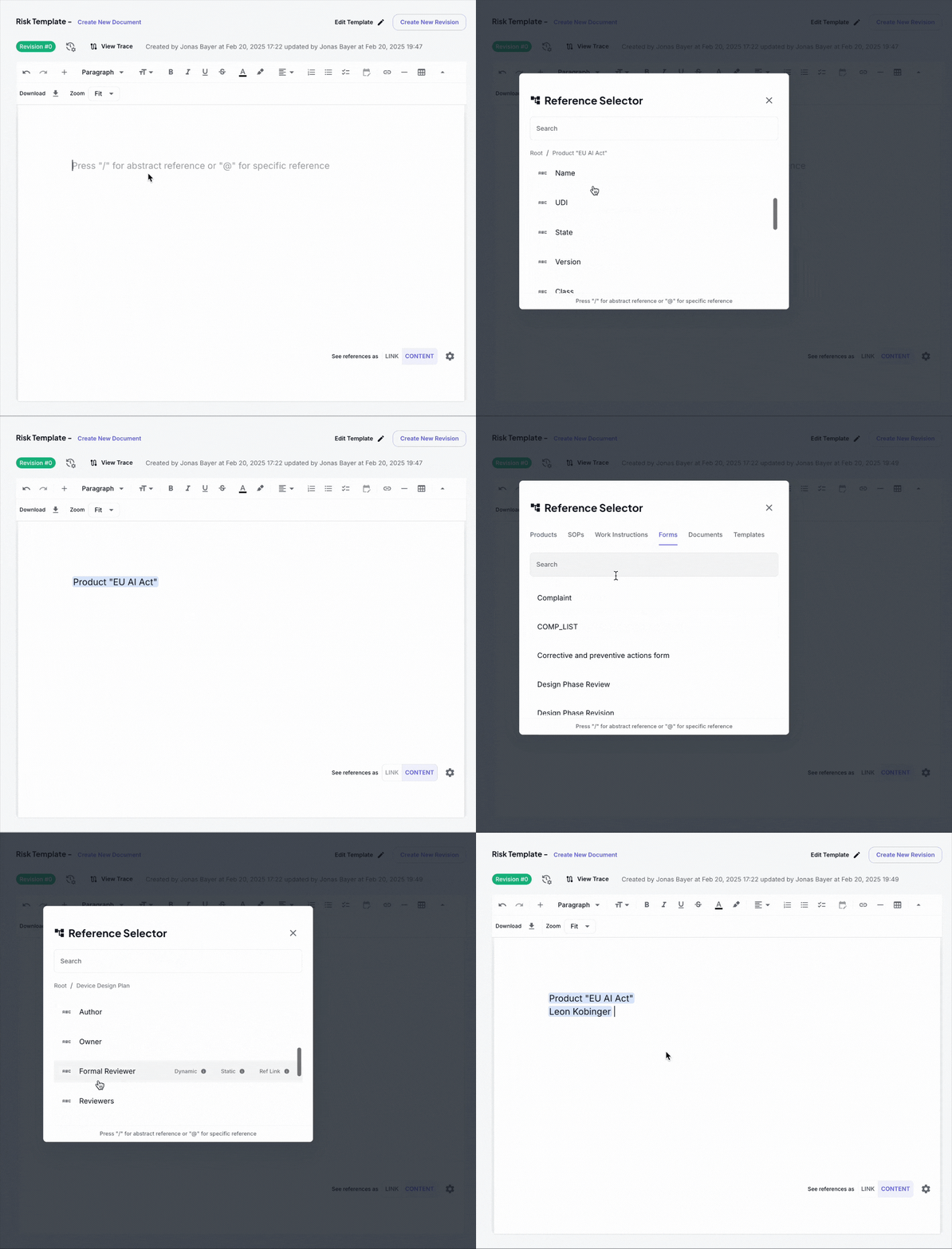
Specific references, initiated by typing "@" in the editor, provide a more direct way to reference exact content. Unlike abstract references, specific references point to particular items in your system. What makes specific references especially versatile is that they come in two variants:
Dynamic Specific References
When you create a dynamic specific reference, you're establishing a permanent link to the source content. These references are visually distinguished by a blue highlights in your document, making them easy to identify. Dynamic references automatically update whenever the source content changes, ensuring your document always reflects the most current information.
For example, if you reference a specific product's risk assessment using a dynamic reference, and that risk assessment is later updated, your document will automatically show the new information.
Static Specific References
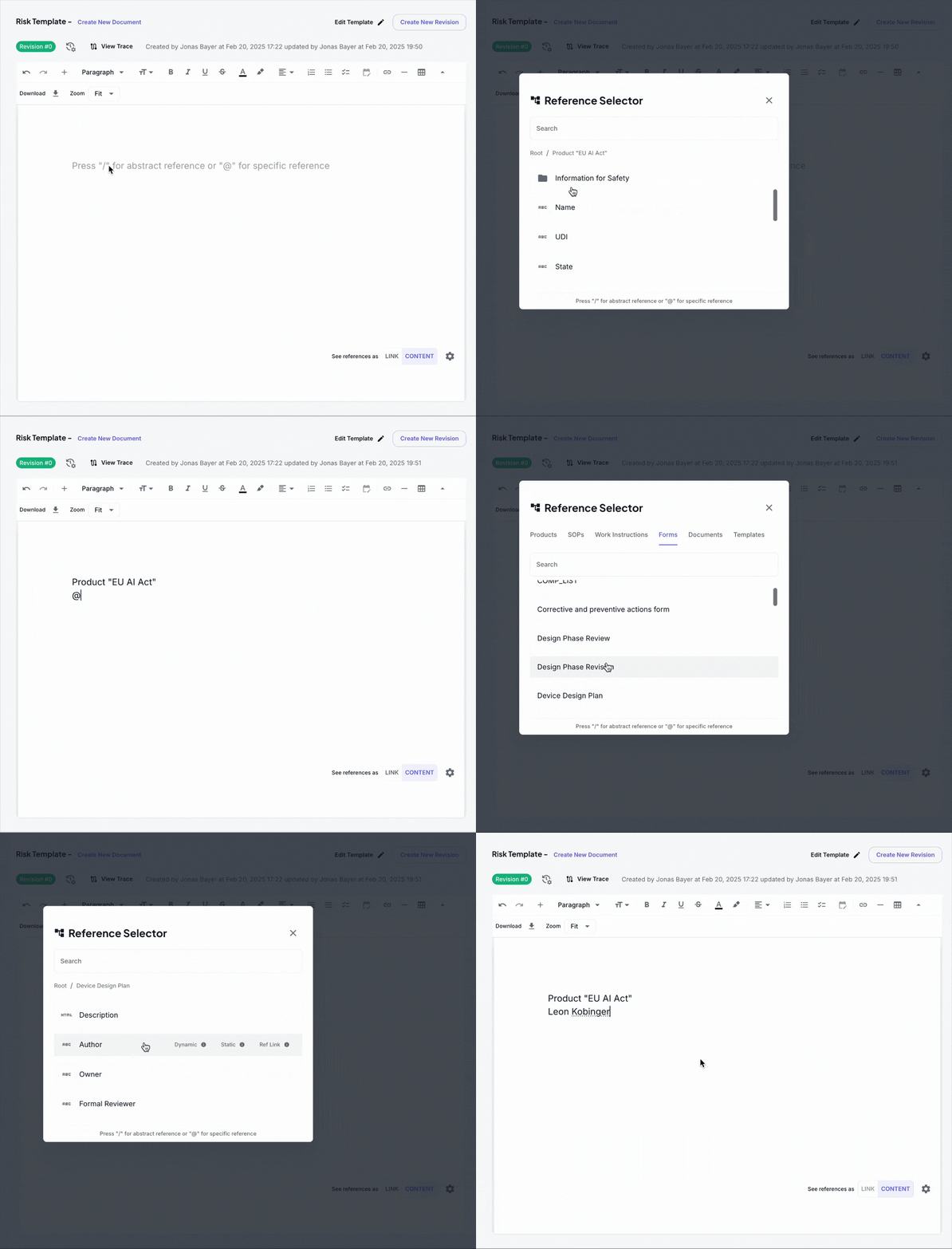
Static references serve a different purpose. When you create a static reference, you're essentially taking a snapshot of the information at that moment. The content is copied into your document as plain text and won't change even if the source content is updated later.
This feature is particularly useful when you need to preserve historical information or when you want to reference information as it existed at a specific point in time. For instance, you might use a static reference when documenting the state of a product at the time of a particular certification or audit.
Understanding Data Types in References
References can display various types of content, each formatted appropriately for its purpose:
Plain Text and Rich Text
The most common type of referenced content is text. Plain text references are perfect for simple information like product names, IDs, or version numbers. Rich text references maintain formatting, including paragraphs, lists, and styling, making them ideal for detailed descriptions or procedures.

Date References
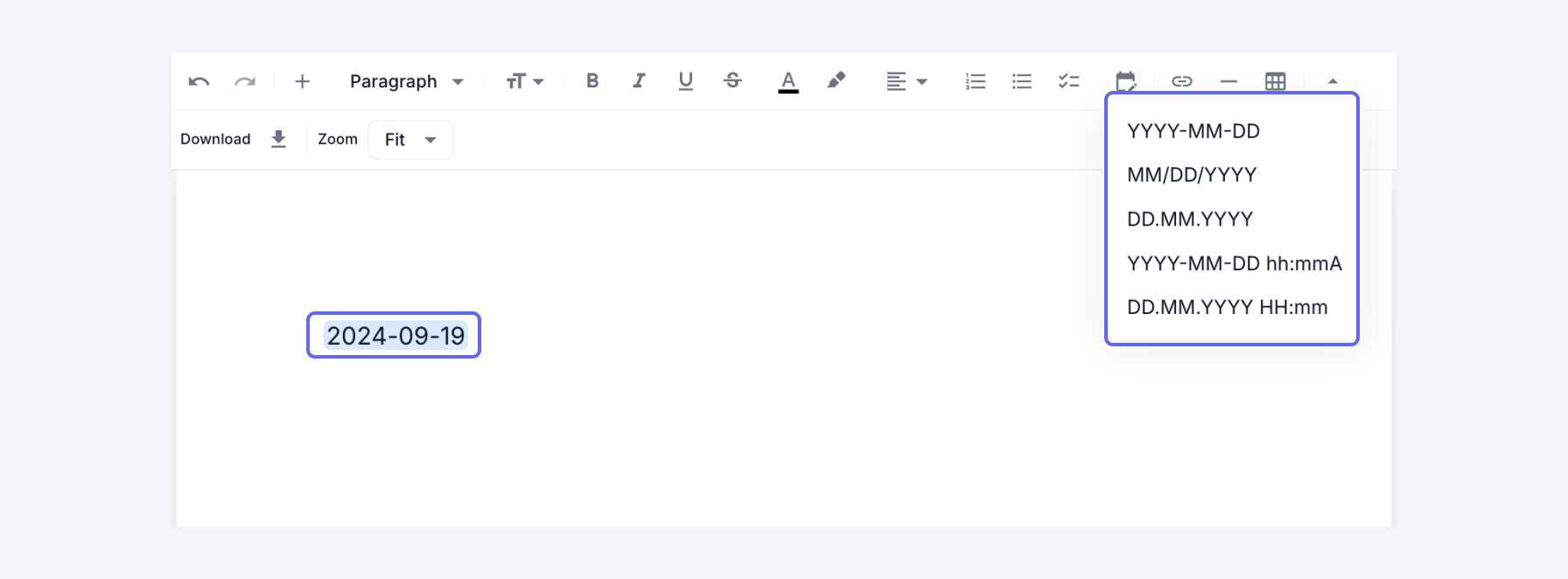
Date references ensure consistent date formatting throughout your documents. They're particularly useful in regulatory documentation where date formatting must be standardized.
Tabular Data
Some information is best presented in a structured format. Tabular references allow you to include formatted tables, such as risk assessments, specifications lists, or compliance matrices, while maintaining their structure and formatting.
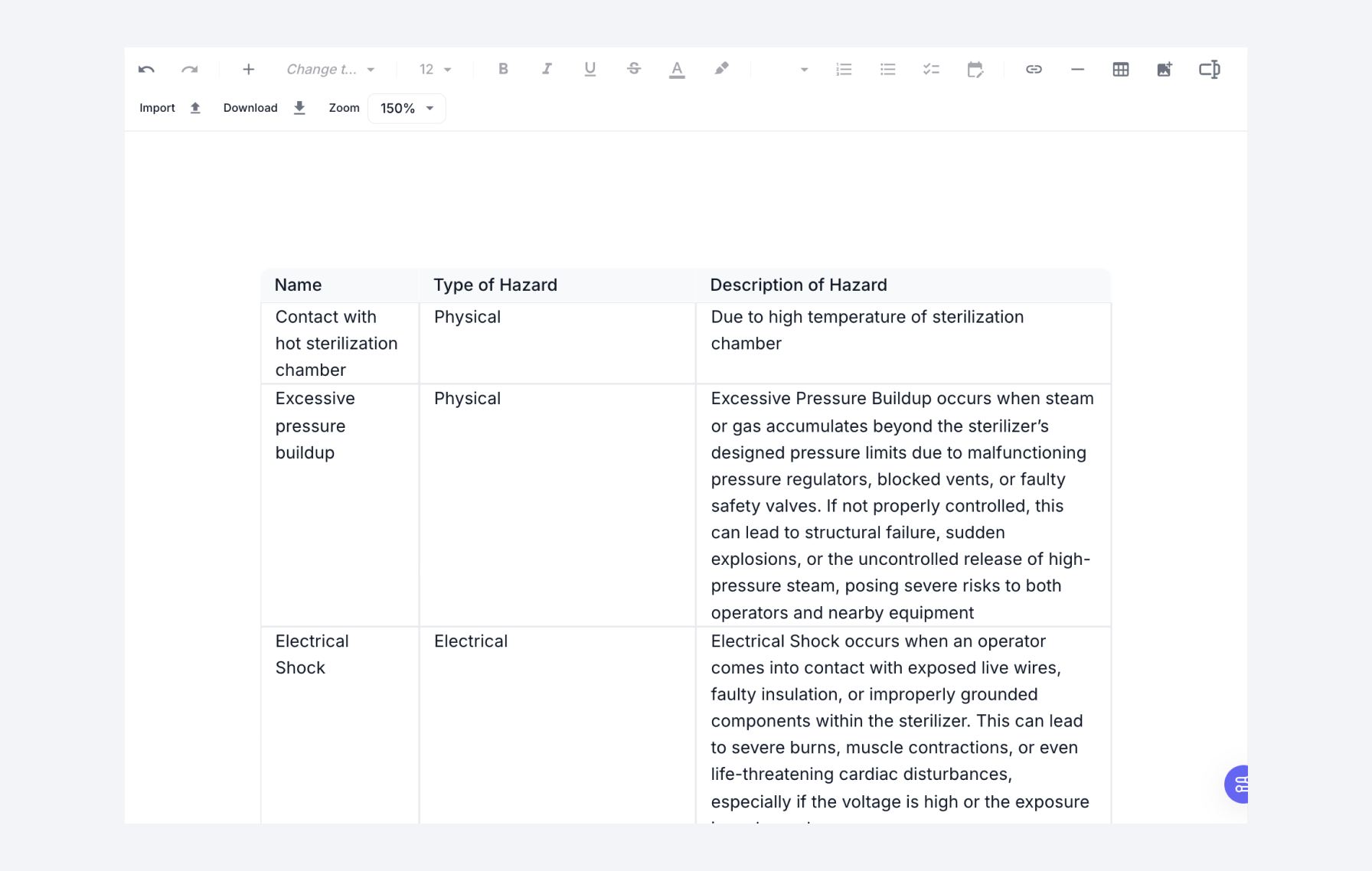
Tabular references come with powerful interactive features that allow users to manipulate and analyze data effectively:
- Sorting: Click on any column header to sort the table by that column in ascending or descending order. This helps quickly organize data based on specific criteria.
- Column Visibility: Use the column visibility toggle to show or hide specific columns, allowing you to focus on the most relevant data for your current needs.
- Filtering: Apply filters to any column to narrow down the data. The filtering system supports text, numeric, and date-based filters.
- Column Reordering: Drag and drop column headers to rearrange them in any order that makes sense for your workflow.
- Column Resizing: Adjust column widths by dragging the edges of column headers, ensuring optimal display of your data.
User References
When you need to reference system users - such as document owners, reviewers, or responsible parties - user references ensure that the correct user information is displayed and maintained.

Making the Right Choice: When to Use Each Reference Type
Understanding when to use each type of reference is crucial for effective document management. Let's explore the scenarios where each type shines:
Abstract References: Building Flexible Documents
Abstract references are the foundation of template-based documentation. Consider a medical device company that produces multiple sterilizer models. Instead of creating separate documentation for each model, they can create a single template using abstract references. The same document can adapt to show information for any sterilizer model by simply changing the Abstract Reference Settings.
This approach offers several advantages:
- Reduces document maintenance overhead
- Ensures consistency across product documentation
- Simplifies the process of creating new product documentation
- Minimizes the risk of outdated information
Dynamic Specific References: Maintaining Current Information
Dynamic specific references are ideal when you need to ensure your documents always reflect the most current information. For example, when referencing safety procedures or risk assessments, you want to be certain that any updates to these critical documents are automatically reflected wherever they're referenced.
A practical example would be a quality management document that references specific product specifications. By using dynamic references, any updates to the product specifications will automatically appear in the quality document, ensuring compliance and accuracy.
Static Specific References: Preserving Point-in-Time Information
Static specific references capture a snapshot of information that remains unchanged, regardless of future updates to the source content. Think of it as taking a photograph - once taken, it stays the same even if the subject changes.
The key advantage of static references is their immutability - once inserted, they serve as reliable historical records, unaffected by subsequent changes to the source material. This makes them invaluable for compliance documentation and audit trails where preserving point-in-time information is crucial.
Conclusion
The reference system in the Text Editor is a powerful tool that, when used effectively, can transform your document management process. By understanding the different types of references and their appropriate use cases, you can create a more efficient, accurate, and maintainable documentation system.