Introduction to BPMN
Business Process Model and Notation (BPMN) is a standardized way to visualize business processes. In CertHub, we use BPMN to model your quality processes, making them clear, consistent, and easy to understand.
Core Concepts
Basic Flow Elements
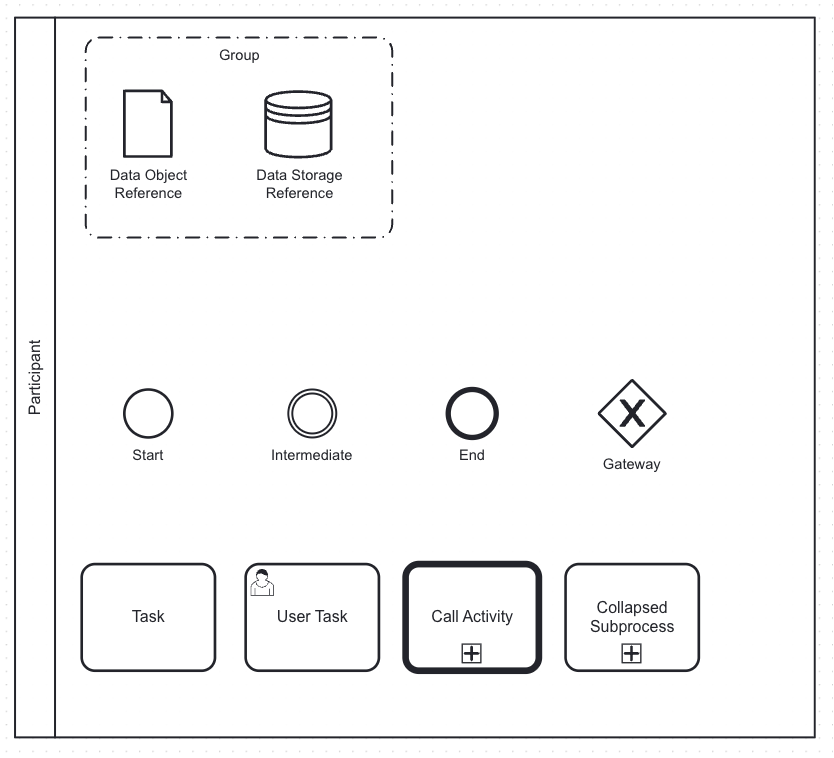
In CertHub, we provide a focused set of BPMN elements that cover the essential needs for quality management processes:
 The core BPMN elements available in CertHub's process modeler
-
Start, End and Intermediate Events (Circles)
- Start event: Marks where your process begins
- End event: Shows where your process concludes
- Simple and clear process boundaries
-
Decision Gateway (Diamond with X)
- Used for making choices in your process
- Splits the flow based on conditions
- Typically used with Yes/No decisions

-
Normal Task (Rectangle)
- Basic activity or work to be performed
- Can include detailed instructions
- Assignable to specific roles
-
User Task (Rectangle with person icon)
- Activities requiring human interaction
- Can have forms attached
- Assignable to specific users or roles
-
Process Reference (Thick Rectangle with plus)
- Links to another process (SOP or Work Instruction)
- Enables process reuse
- Maintains process hierarchy
-
- Collapsed Subprocess (Thin Rectangle with plus)
- Groups other Process Elements to a Subprocess
- Maintains process hierarchy
- Enables better overview and structure
These elements are connected using:
- Sequence Flows (Solid arrows): Show the order of activities
- Connections: Link elements in a logical flow
This focused set of elements helps create clear, consistent processes without unnecessary complexity. Each element has a specific purpose in quality management workflows.
Connecting Elements
-
Sequence Flows (Solid arrows)
- Show the order of activities
- Connect events, activities, and gateways
- Define the process path
-
Message Flows (Dashed arrows)
- Show communication between participants
- Indicate information exchange
- Connect different process pools
Organizing Elements
-
Pools
- Represent major participants
- Contains one or more lanes
- Example: Your organization
-
Lanes
- Subdivisions within a pool
- Often represent roles or departments
- Example: Quality Manager, Production Team
-
Groups
- Logical grouping of related activities
- Used for documentation or categorization, not execution
- Example: Risk Management Steps, Compliance-Related Tasks
Further BPMN Usage
-
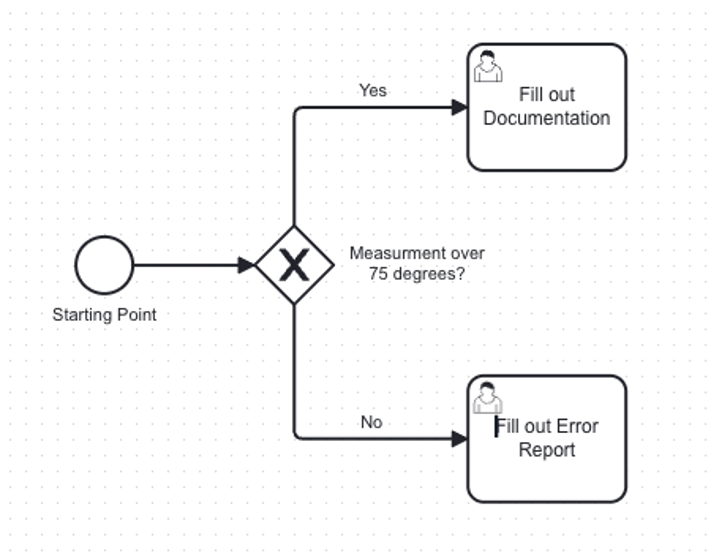
By double-clicking each element, you can assign descriptions to them to optimize readability.
-
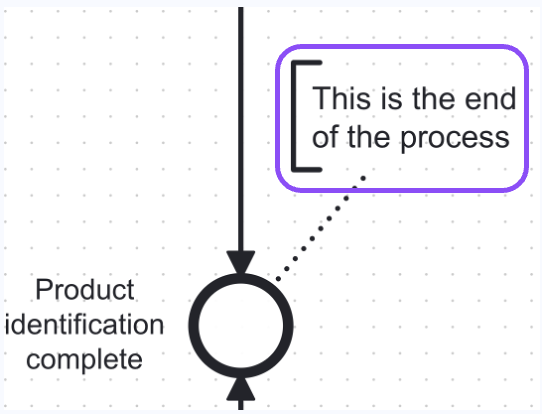
If normal descriptions are not sufficient, Text Annotations can be included for each element providing even more detailed information on single elements.
In BPMN, Data Objects help represent the information used or produced during a process. Two related concepts are:
-
Data Object Reference
- Represents a specific piece of data used in a process step
- Can be input, output, or both
- Shows how data flows between tasks
-
Data Store Reference
- Represents persistent storage of data (beyond the process lifespan)
- Often used for reading from or writing to long-term repositories
- Indicates databases, archives, or document management systems
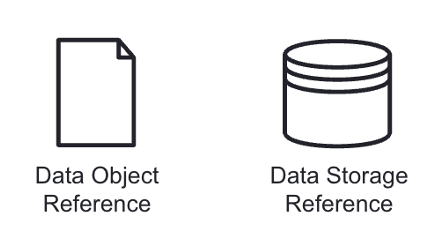
Data Object References and Data Storeage References typically mark Elements that cannot be maintained within CertHub.
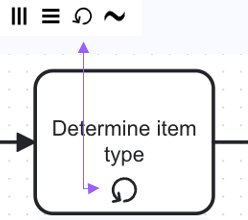
 Loop marker: Indicates that the associated activity or subprocess should be repeated in a loop until a certain condition is met.
 Parallel marker: Indicates that the tasks within a subprocess can be executed in parallel.
 Ad hoc marker: Indicates that the tasks within the subprocess can be performed in any order or repeated as needed.
 Sequential marker: Indicates that the tasks within a subprocess should be executed sequentially.
Naming Conventions
Activities
- Use verb-object format (e.g., "Review Document", "Approve Change")
- Be specific about the action
- Avoid generic verbs like "Handle" or "Process"
Events
- Use object-state format (e.g., "Document Approved", "Change Requested")
- Be specific about the business state
- Clearly indicate success or failure states
Gateways
- Label data-based gateways with questions
- Use clear conditions on outgoing flows
- Keep labels concise but meaningful
Processes
- Name pools after the process they contain
- Include responsible role if relevant
- Use clear business terminology
Best Practices
-
Keep It Simple
- Use clear, consistent naming
- Avoid overcomplicated flows
- Break down complex processes
-
Use Appropriate Detail
- Include enough information to be clear
- Avoid unnecessary complexity
- Focus on the process flow
-
Maintain Consistency
- Use standard naming conventions
- Apply consistent layout patterns
- Follow organizational standards
-
Model from Left to Right
- Follow natural reading direction
- Keep process flow clear
- Minimize crossing lines
-
Emphasize the Happy Path
- Make the main flow clearly visible
- Keep exception handling to the sides
- Use consistent layout for alternatives
-
Avoid Common Pitfalls
- Don't mix different gateway types
- Avoid overlapping sequence flows
- Don't overuse lanes when pools are better
- Skip technical details in business processes
Additional Resources
For more detailed information about BPMN modeling:
- Camunda BPMN Best Practices - Comprehensive guide to creating readable process models
- BPMN.de - Detailed German resource for BPMN modeling
- Signavio BPMN Guide - Introductory guide to BPMN concepts
Start with simple processes and add complexity only when needed. Focus on making your processes clear and understandable for all stakeholders.